Webtop 4.1: X11 is dead and what is Selkies, anyway?
We've now switched our Selkies desktop containers to run in Wayland mode by default, if for any reason you want to got back just set -e PIXELFLUX_WAYLAND=false as noted in the change log for each container. For x86_64, Wayland mode requires a CPU with AVX2 support (Haswell or better so basically anything made past 2013), without it the server will fall back to X11 mode. The striped x264 encoder has also been removed by default as it really only sees benefits on these older CPUs, this can be re-enabled with -e SELKIES_ENCODER="x264enc,x264enc-striped,jpeg".
After months of user interactions it has become clear many of our users seem to have some confusion about what exactly is happening in our desktop images. Admittedly, this is mostly my fault for not taking the time to document the stack in any centralized fashion. Since the main splash for the Selkies repo mentions WebRTC, most people assume we’re simply pushing a video stream into a browser over WebRTC.
This is not the case.
Selkies is a ground-up, web-native, remote desktop protocol meant to replace legacy VNC stacks and web based game streaming services as a whole. This is a generational leap that abandons the RFB (Remote FrameBuffer) protocol for something better. It is the best of both worlds with no compromise on image quality, less resource usage, and a constantly evolving feature set to truly bring a remote desktop (or application) into your web browser. We’re talking native input methods, broad client device support, clipboard integration, gamepad support, drag-and-drop file management, and multi-user collaboration.
To break down what Selkies actually is, we need to look under the hood at how it works and why we built it this way.
1. WebSockets for RGB data delivery
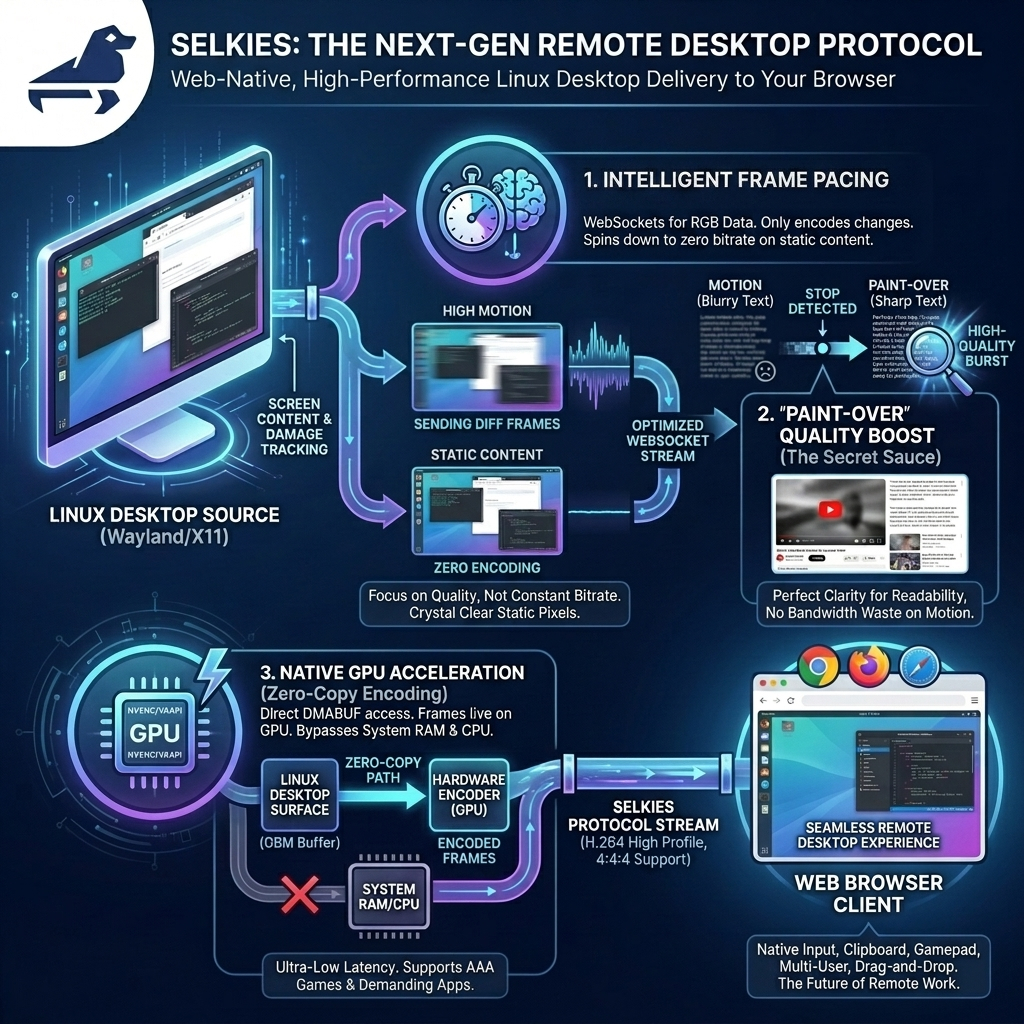
We use WebSockets in a custom stack to optimize the delivery of RGB pixels for desktops. Protocols like WebRTC are incredibly strict on maintaining a constant stream. You have to encode and keep sending data to the client, which is CPU intensive. That really only makes sense if you are leveraging a GPU and do not care about it churning data 24/7. While WebRTC is an advanced video delivery protocol with numerous benefits over sending video frames via binary websocket messages i.e. it can survive packet loss, it is UDP, and it is a mature technology stack. The core issue is a conventional video stream does not provide a similar desktop experience as an image based VNC solution.
So we started over leveraging video codecs with a different goal: deliver a high-motion experience, but with crystal-clear pixels when the content is static. Coming from the VNC world where every pixel and CPU cycle was optimized to only grab, encode, and send exactly what changed, the concept of maintaining a constant video stream of a static desktop was completely foreign to me.
Enter WebCodecs, the W3C spec for low-level video decoder and encoder management. When this got implemented, I instantly knew we could build a protocol where we shoot for a level of quality, not a bitrate. We can spin the encoder and decoder down to absolute zero when there is no motion on the screen.
This frame pacing is tightly tied to our underlying Wayland desktop session. The Linux desktop tells our Rust compositor exactly when there has been a change on the screen (damage tracking), so we only encode the frames that need to be sent. We do this without hashing, stripping out another layer of overhead. From the generation of the pixels on the desktop to what your eyes see in the browser, we are in total control and intelligently use server/client resources for high density VDI deployments.
2. "Paint-Over" (The Secret Sauce)
Cleaning up the screen when the user is trying to read something is, in my opinion, the absolute most crucial part of our hybrid video encoding protocol. Without it, text stays blurry and unreadable while the server sits there chewing on dumped frames and encoding deltas that are pointless in a typical video streaming solution.
To solve this, our Rust backend counts the frames since the last movement. When we detect that motion has stopped we trigger a "Paint-Over." We send a low CRF (Constant Rate Factor) keyframe and a burst of high-quality deltas. This forces the screen to snap to perfect quality again.
The best way to demo this is to use a wider range for motion CRF and paint-over quality. This is not a good production practice but it is easier to visualize like this. A good simple example is scrolling a page of text and stopping with motion CRF set to 50 (worst) and paint over to 18 (our default). The idea here is while the pixels are in heavy motion, your eyes cannot tell the difference, so there's no reason to waste bandwidth sending crispy pixels. But the second you stop scrolling, the cleanup hits, and you can actually read again:
Cleaning up the screen has a secondary side effect. When high motion resumes, we don't just throw away the clean pixels. We just start sending diffs at that lower quality again. A video playing inside the session has absolutely no effect on the pixels surrounding it:
3. Zero-Copy GPU Encoding
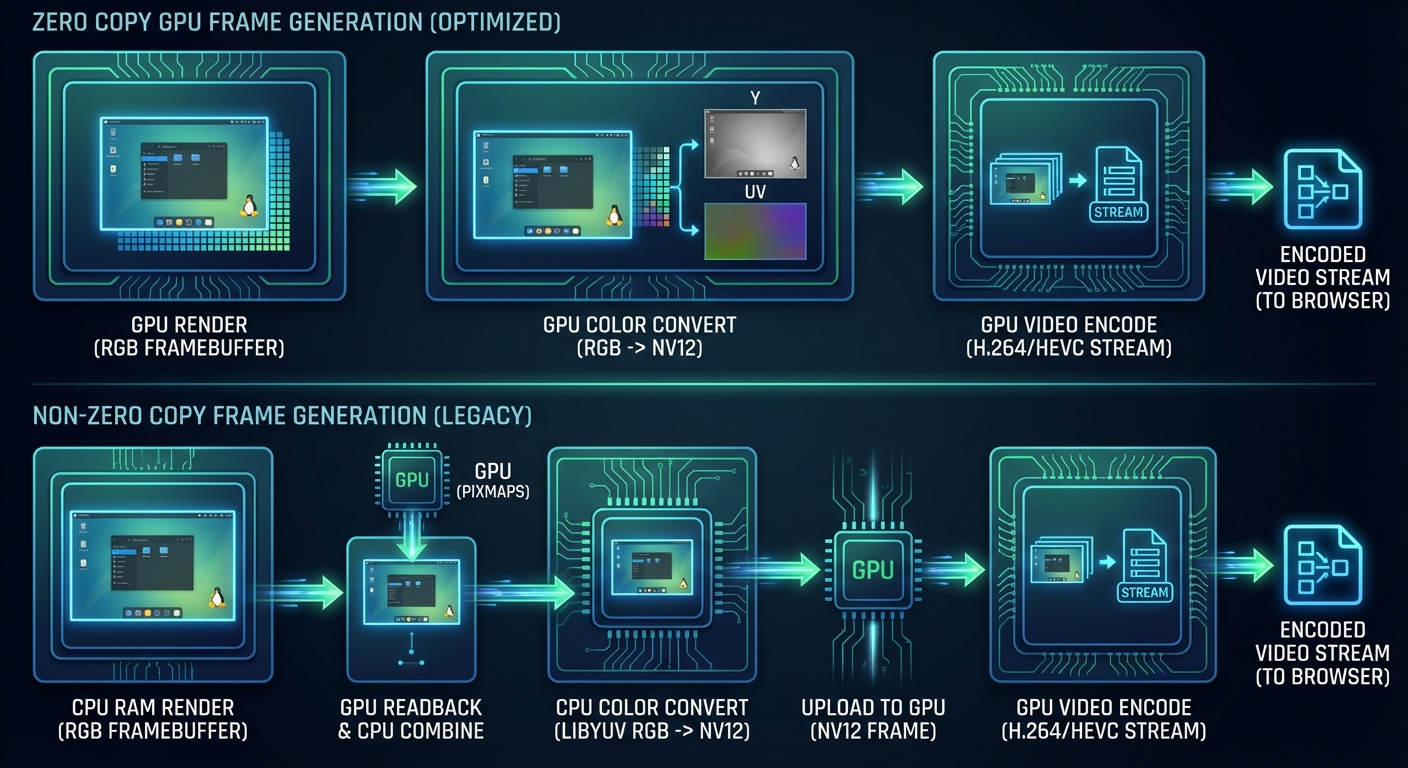
If you are lucky enough in this economy to have access to a GPU, the frames now live entirely on the GPU.
Wayland allows us to assign a GBM (Generic Buffer Management) buffer to the video card just like you would with a normal desktop application. We can then nest whole desktop environments into this surface. Our Rust compositor makes api calls to the GPU to pass these DMABUFs directly to the hardware encoder (NVENC or VAAPI). The pixels never touch your system RAM or CPU unless we explicitly force a readback. We control this process in the exact same manner as our CPU encoding, so you are getting the same benifits of that pipeline and the protocol behaves the same. These are not just default gstreamer or ffmpeg encoding profiles we still have the same level of control.
This means ultra-low latency, fast frames, and native 3D acceleration support. If something works on a Linux desktop, it will work inside of our stack, from simple OpenGL/Vulkan demos to the most demanding AAA games.
"But JPEGs look better!"
Ok, use the JPEG mode. I am not your dad. It is there for complete legacy support.
But also: Bullshit.
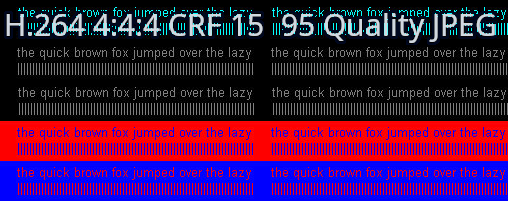
Low CRF (sub-20) H.264 frames—particularly when encoded with 4:4:4 chroma subsampling—look identical to, or better than, WebP or JPEG. At 10 CRF, you are essentially getting lossless 8-bit RGB encoding. Unless you are getting images at higher than 8-bit, you are getting the same quality with massively less bandwidth and CPU usage compared to legacy image solutions. Don't believe me? Here is the infamous chroma-444 test image compared with h.264 4:4:4 and JPEG.
RGB bits are just that, there are many ways to approach this but in the end if you turn the knobs up on these compression standards you achieve near lossless encoding.
With the sheer amount of HiDPI monitors on client machines today, we can actually deliver a usable, high-framerate experience at 4K+ resolutions without stretching out your screen and presenting a pixelated mess. Because we are tightly integrated with the underlying desktop, we automatically make this a seamless experience. If your client's browser is at a 2x zoom (like a MacBook Retina display), the second you land on the page, we tell the underlying desktop to run at 2x scaling. We deliver every single one of your pixels natively. We do not hoard your pixels and fake it by stretching the image client-side. This one is a no brainer when you stretch an image out 2x even with clientside anti aliasing it clearly will not look the same.
Server side scaled 2x Chromium:
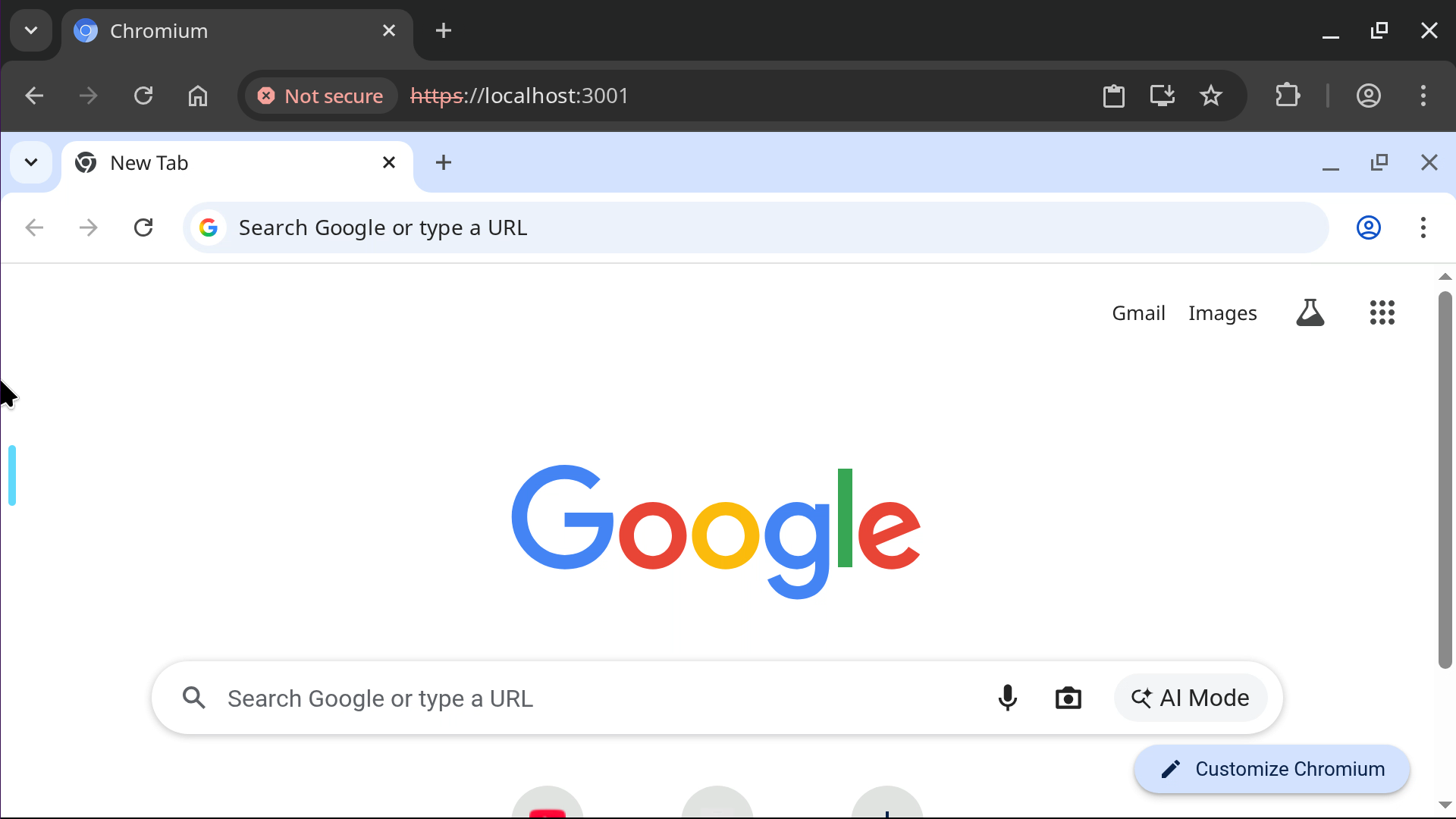
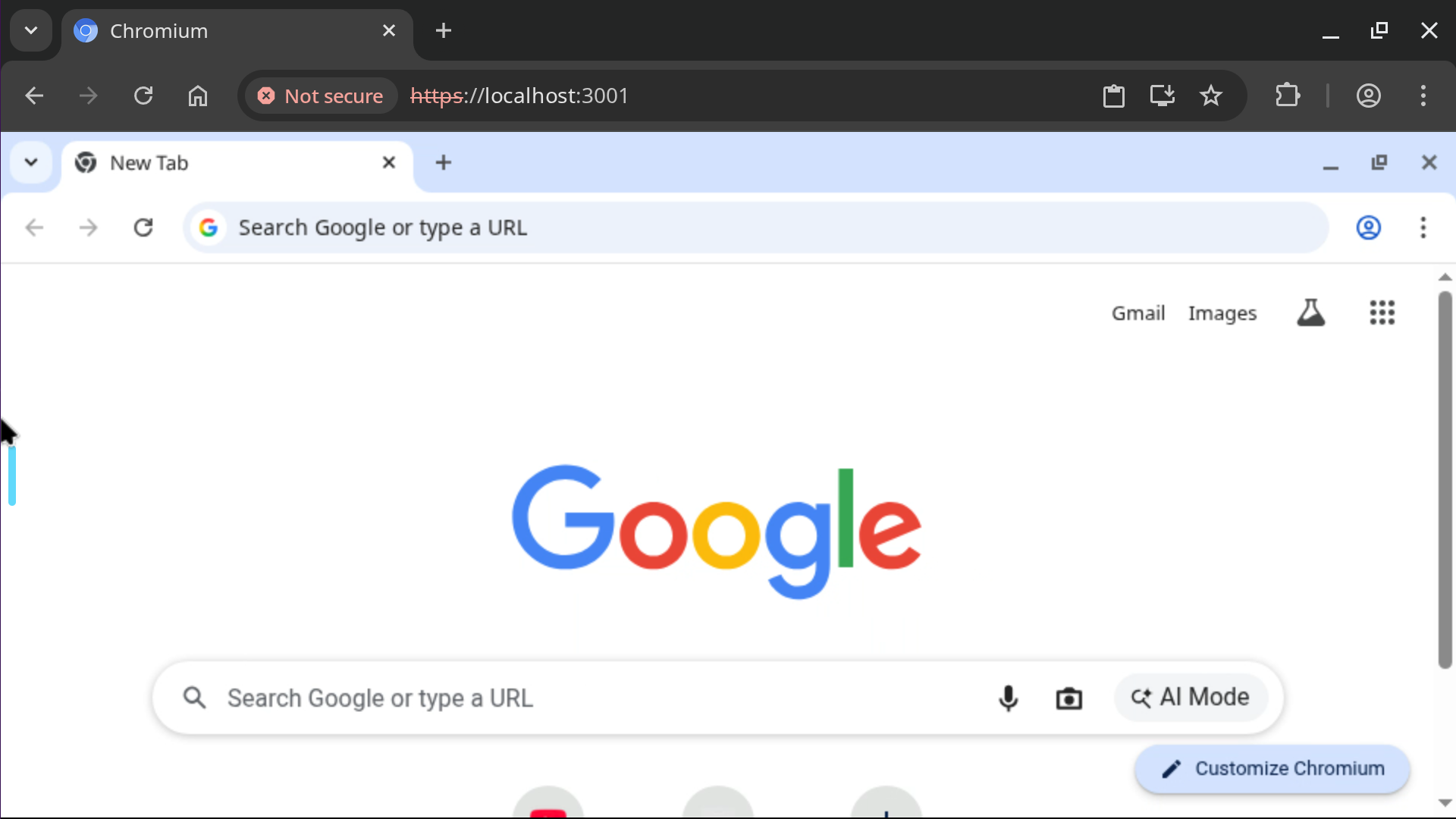
We do this because our protocol even with just a CPU is still performant at these resolutions while something like jpeg or webp encoding falls apart due to the sheer amount of data you are sending to the client. Sending binary data over websockets and https is not free, the size of the frames matter more than you might think. VNC image based solutions lack the basic feature we are leveraging here which is sending delta frames that only contain the pixel changes from the last rendered frame.
Where are my encoder options????
Some people seem to be confused about the options in the sidebar because they are used to manually clicking NVENC or VAAPI tags.
We specifically use High Profile H.264 (with 4:4:4 chroma subsampling when selected) because it is the only universally supported codec mostly free from patent trolls. We don't label encoders by GPU in the UI because our backend is smart enough to figure it out: if the GPU is there, we use it. It is that simple. You can force this off by selecting CPU encoding or playing with our exhaustive environment settings.
(Disclaimer: I am not a lawyer and cannot tell you with certainty you can deploy this in a commercial environment and avoid the trolls, but we have done everything we can to make that possible. For the most part, H.264 patents are dead, and these trolls have a very hard time making a case with their expiring patents).
AV1 will eventually be our savior, but computer hardware just isn't there yet. The encoders only exist on bleeding-edge hardware, and even then, they use significantly more resources to generate frames than H.264. AV1 is also currently missing 4:4:4 chroma subsampling in most hardware implementations, which is strictly required for certain color combinations (like red text on a black background) to not look like garbage.
We are making a generational jump here away from JPEGs. After a careful review of Intel, AMD, and NVIDIA hardware combined with mobile clients, only H.264 fits the bill on all fronts while being better than image-based delivery on all fronts. While it is possible to let power users try stuff like AV1, our focus remains on making a universal solution for all pixel delivery to a web browser.
What is new since our last post on Selkies?
Wayland is now the default for single application containers and Webtop flavors where X11 is phased out. We have millions of pulls, and have worked tirelessly to address bug reports and platform oddities.
The focus lately hasn't been on shiny new features; it has been on the stabilization of the Wayland pipeline while cutting our containers over to it. I can confidently say now that our X11 stack is on life support. It offers no stability or feature benefits over the Wayland stack. There is no longer a reason to use it as this is why Xwayland exists in the first place. Let it die.
We've put an emphasis on our GPU integration. For the first time, we have real Linux desktop GPU support, not something hacked together that only works half the time. We needed these encoders and the decoding of these frames to be rock solid across all platforms.
Here is a list of notable changes since Wayland support was first announced:
- Fixed multiple encoder and decoder errors, All video modes including 4:4:4 chroma subsampling will work across all modern web browsers and mobile devices. On GPU accelerated sessions VAAPI lacks a 4:4:4 encoder if enabled when leveraging Intel or AMD the pixels will be read back from the GPU and this does effect performance. Nvidia can do 4:4:4 with it's zero copy pipeline.
- Complete Wayland KDE integration including clipboard, international input, and fractional scaling. We run Kwin nested in our Smithay display socket and Plasma on top of it. This is the bleeding edge Plasma experience with all the features you expect:
- Fedora 44 and Ubuntu Resolute Webtops have been in the wild for some time now.
- The official Unraid Nvidia plugin has been updated to function with Selkies based containers. A big thanks to ich777 who identified the files missing in the container toolkit and personally tested support on our OrcaSlicer container.
- PRoot Apps has been updated with international font and ascii rendering while going through a maintenance cycle and certifying the build logic and runtime for the large list of supported applications.
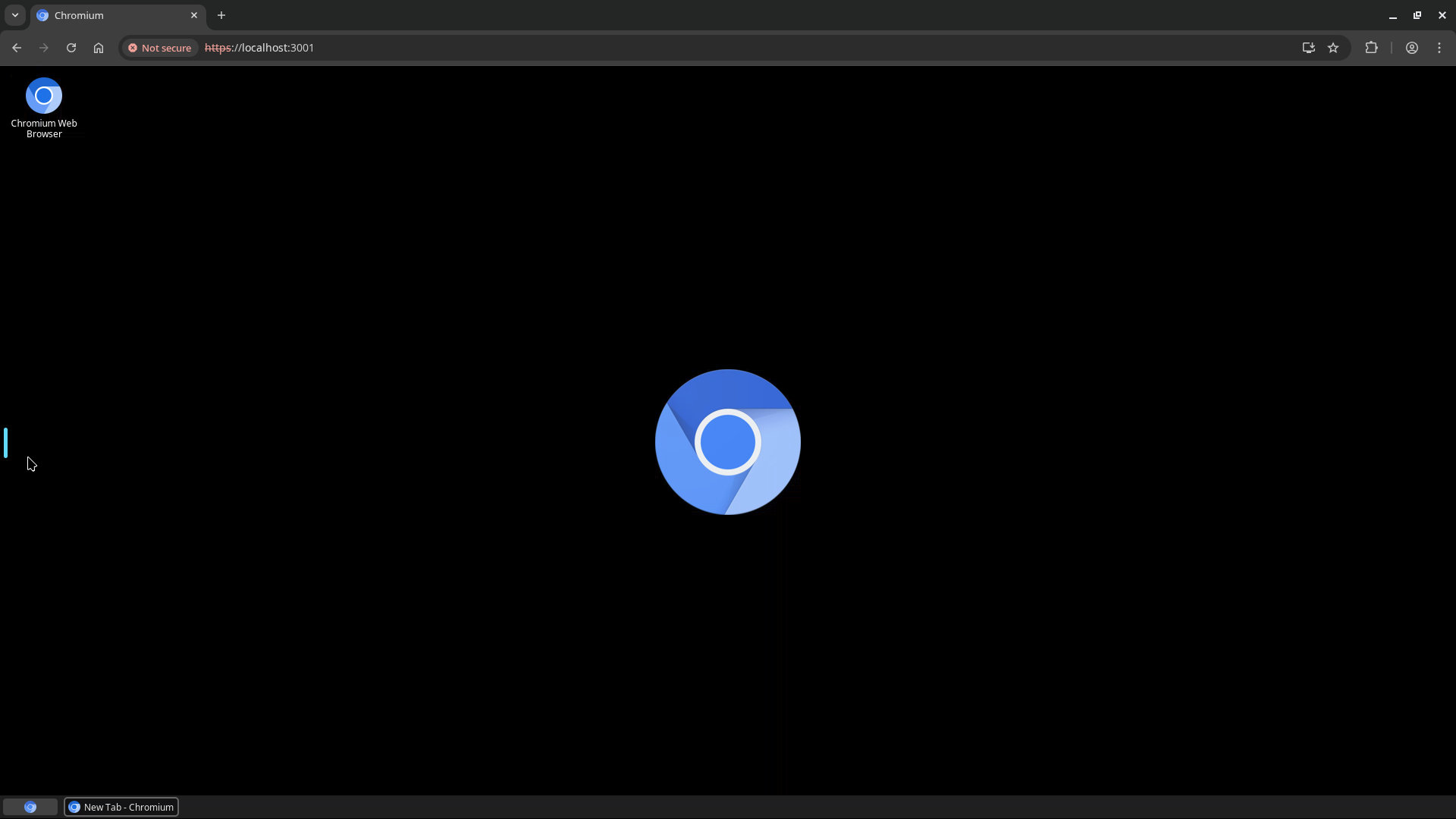
- For all of our single application containers a new in house interface is available Selkies Desktop. This tiny purpose built binary can be activated on any container by passing
-e SELKIES_DESKTOP=true. This will render a custom desktop giving you a simple start menu, multi application window management, a wallpaper, and desktop icons. 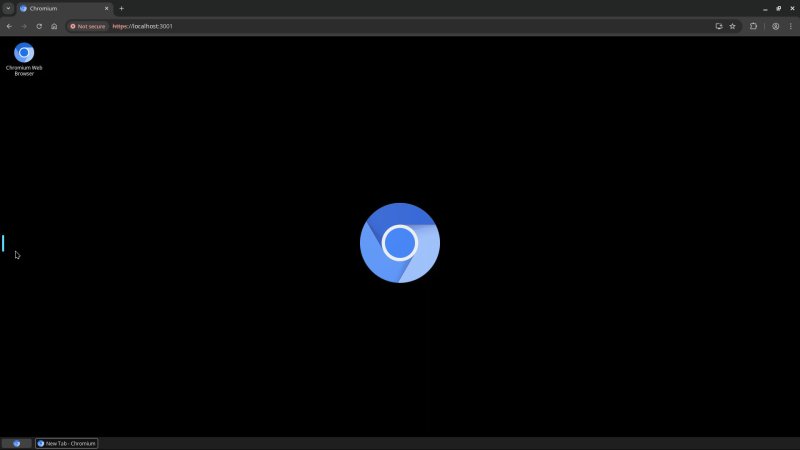
- With the release of Android 16 and the new default Android desktop input and behavior bugs were squashed for full compatibility: (captured on a Pixel 8)
- We have added some new containers since our last update.
- Blade of Agony - Wolfenstein: Blade of Agony is a story-driven WWII first person shooter inspired by Wolfenstein and Doom. A GPU is required to run this container.
- Brave Origin - A new tag on brave is available
lscr.io/linuxserver/brave:originthis is the stripped down nightly build of Brave Browser. - Eden - Eden is an experimental open-source emulator for the Nintendo Switch, built with performance and stability in mind.
- Helium - Helium is a Chromium-based web browser made for people, with love. Privacy-first with unbiased ad-blocking.
- PPSSPP - PPSSPP is a free and open-source PSP emulator for Windows, macOS, Linux, iOS, Android, Nintendo Wii U, Nintendo Switch, BlackBerry 10, MeeGo, Pandora, Xbox Series and Symbian with a focus on speed and portability.
- shadPS4 - shadPS4 is an early PlayStation 4 emulator for Windows, Linux and macOS written in C++. Even if you have a low end server or video card you might be surprised with what you can actually run using shadPS4 as it is HLE.
- VSCode - Some of our users pointed out many proprietary Microsoft features only work on the non forked VSCode application so it has been added to our collection.
- Webstation - Webstation is a web native emulation focused desktop based on Ubuntu. This combines many different emulators into a one stop shop using our new Selkies Desktop.
- Weixin - Wechat has been overhauled into a Selkies Desktop image with window management.
- WineGUI - WineGUI is a user-interface friendly Wine manager that provides a graphical frontend for creating and managing Wine bottles.
- As stated earlier a whole laundry list of stability related bug fixes. Long running sessions linked to GPUs no longer exhibit random crashing or memory spikes, clientside input across all languages with an emphasis on IME has been certified by many native speakers.









You are the developer.
All of our Selkies-based containers are rapid development environments. It is dead simple to test a change. The core server is written in Python intentionally to facilitate this (while our high-performance compositor runs in Rust). Just clone the source and run the container of your choice. Anytime you change the Python or frontend Javascript, it will be updated and delivered straight to your browser.
git clone https://github.com/selkies-project/selkies.git
cd selkies
git checkout -f lsio
docker run --rm -it \
  --shm-size=1gb \
  -e DEV_MODE=selkies-dashboard \
  -e PUID=1000 \
  -e PGID=1000 \
  -v $(pwd):/config/src \
  -p 3001:3001 ghcr.io/linuxserver/webtop:ubuntu-kde bash
Come build the future of the remote web desktop with us.