Let me start with the TLDR because this one is long, and I mean long even by my standards. Selkies 2.0.0 shipped on September 24th. Every LinuxServer.io Selkies based container has been rebuilt on it, along with pixelflux 2.1.0 and pcmflux 2.1.0 underneath. Five video codecs instead of one. WebRTC as a real first class transport next to our WebSockets protocol. Zero copy encoding on X11, not just Wayland. Mount the card in and we figure out the rest, on NVIDIA, Intel, AMD, or no GPU at all. Dual monitors that behave like monitors. A webcam, a printer, and a Steam installer in every container without any extra Docker privileges. A stats panel that tells you why your stream is slow instead of making you guess. An AI agent that can drive the desktop. And a userspace app store that grew from 92 to 109 apps and now does NVIDIA.
If you just want the potentially breaking upgrade notes, here they are:
- The encoder list changed names.
x264encstill works as an alias forh264enc, butx264enc-stripeddoes not. If you followed the last post and set-e SELKIES_ENCODER="x264enc,x264enc-striped,jpeg", change it toh264enc,h264enc-striped,jpegor just delete the variable. The new default ish264enc,h265enc,vp8enc,vp9enc,av1enc,jpeg. - Every
SELKIES_H264_*variable is nowSELKIES_VIDEO_*because the settings are no longer codec specific. Our init scripts translate the old names for you, so nothing breaks, but update your compose files when you get a chance. - NVIDIA users need host driver 580 or newer and NVIDIA Container Toolkit 1.20.1 or newer. Add
--device /dev/nvidia-modesetto your run command. On drivers older than 595.80 you may still neednvidia-drm.modeset=1and a dummy plug. DISABLE_ZINKandMAX_RESare gone. Nothing needs them anymore.- The
lsiobranch of Selkies no longer exists. It was merged intomainin June. If you were developing against it, just usemain.
For LinuxServer.io containers, the documentation is now centralized at https://docs.linuxserver.io/selkies/. Please refer to this documentation when troubleshooting issues, as it will always reflect the current state of our containers and their configuration.
Before you read on: we are not the only Selkies containers
LinuxServer.io is a self hosting organization. Our images are built for one person, or a household, on Docker or Podman (Podman is best effort, don't @ me bro), with s6-overlay as PID 1 and a stack of opinions about how a container should behave. Selkies upstream ships its own containers, and if you are running this in a Kubernetes cluster, on an HPC scheduler, with a foreign init, or across a fleet of datacenter GPUs, that is where you should be looking, not here.
selkies/desktopis the upstream reference image, built in the Selkies repo itself. It is an LXQt desktop on top of upstream's own base, rootless at uid 1000, supervised by plain s6-svscan rather than s6-overlay so its entrypoint works as PID 1 or under any init you inject, with an embedded coTURN. Ubuntu 26.04 or Debian Trixie, amd64 and arm64.docker-selkies-egl-desktopis a KDE Plasma desktop on that base with Steam and Wine Staging. Applications reach the GPU through EGL and DRI3 on the base's own display servers, so one GPU can serve as many containers as it has memory for, on NVIDIA, AMD, or Intel.docker-selkies-glx-desktopis the same Plasma desktop, but it runs a real X.Org server on the GPU with the vendor's own X driver. That is the image where NvFBC lives. The X server owns the card, so it is one GPU per container, and it is X11 only.
Every README over there carries run commands for Docker, Kubernetes, and Apptainer. Everything below this line is about our images, and where I talk about NvFBC, keep the GLX image in mind, because that is the only place it engages. More on that in section 3.
Contents
- 1. Five codecs, use whatever your system supports
- 2. Pixelflux 2: one Rust pipeline for both display servers
- 3. X11 is dead. Long live X11.
- 4. WebRTC, properly this time
- 5. The client got out of its own way
- 6. The stats panel, or "why is it slow"
- 7. Dual monitors, first class
- 8. A webcam in every container, in userspace
- 9. Gamepads: the interposer grew up
- 10. Steam in any container, no privileges required
- 11. Printing through the browser
- 12. Webstation, RomM, and couch co-op in a browser
- 13. Collaboration, secure mode, and the operator's toolbox
- 14. Clipboard and files, paced like everything else
- 15. Stream a desktop you already have
- 16. Pelorus: Some AI bullshit no one asked for
- 17. PRoot Apps: 109 apps, NVIDIA, and an AI shelf
- 18. Sealskin 0.3
- 19. The containers themselves
- 20. Selkies beyond Docker
- Odds and ends
- You are the developer
Now for the part where I try to explain what has happened in five months. Between the Webtop 4.1 post and today the Selkies repo alone took 804 commits and grew by 190,000 lines, most of them from Seungmin Kim (ehfd), who has been an absolute machine upstream while I focused on the container side, pixelflux, proot-apps, and the new companion projects. Pixelflux took another 280 commits. The baseimage took 154 commits and 246 image builds. Two projects that did not exist in April, Pelorus and romm-broker, are now shipping. I am going to go through all of it.
1. Five codecs, use whatever your system supports
In April I wrote that "only H.264 fits the bill" and that "AV1 will eventually be our savior, but computer hardware just isn't there yet." While this is still true, there is no good reason for you to be walled out if you have the hardware. So we did the work and added detection and decision matrices on the server and client to allow you to do whatever either side is capable of.
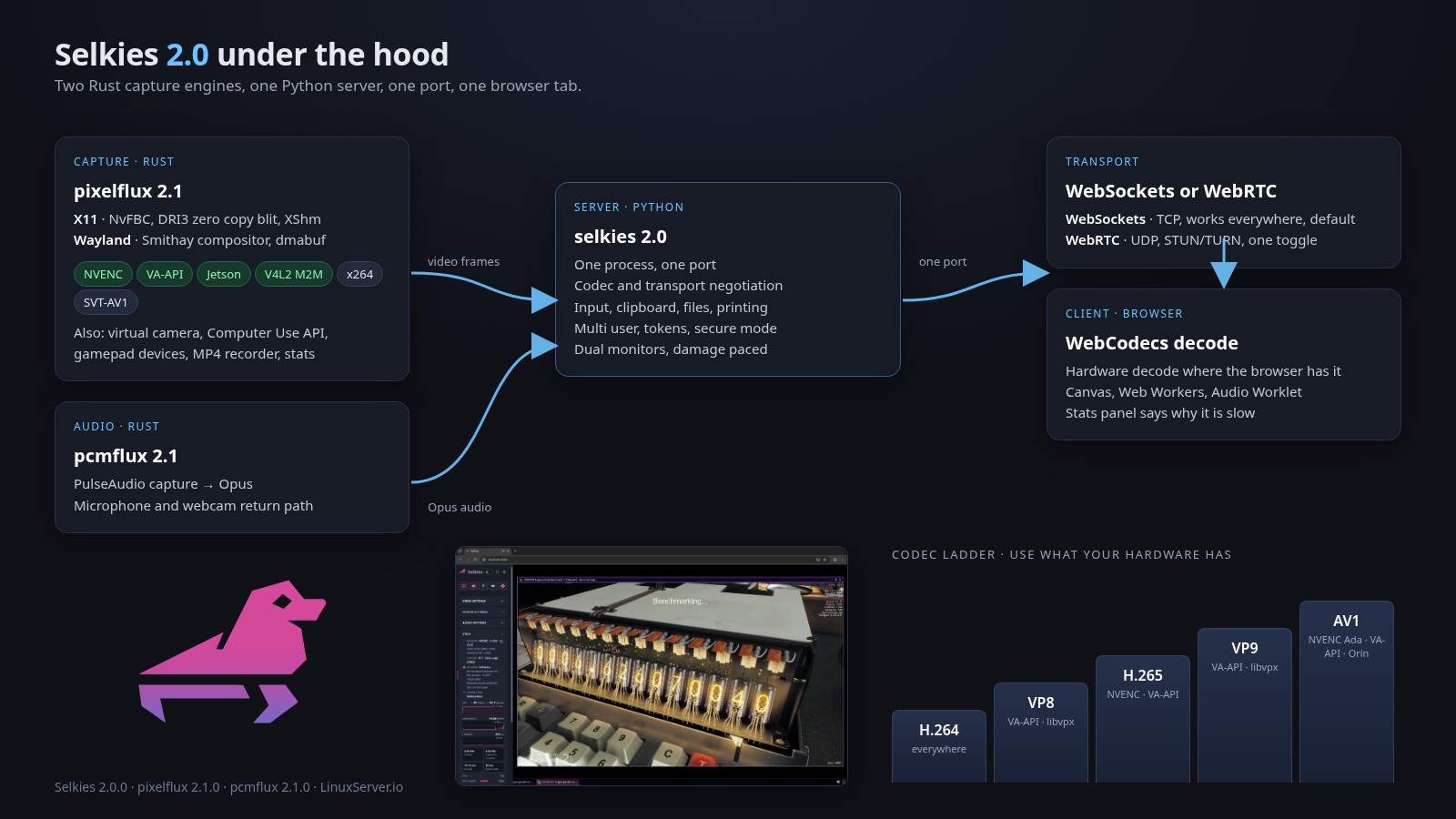
Selkies 2.0 streams H.264, H.265/HEVC, VP8, VP9, and AV1, over both WebSockets and WebRTC, on NVENC, VA-API, and in software. JPEG and striped H.264 are still there for legacy fallback.
| Encoder | Hardware | Software |
|---|---|---|
h264enc (default) |
NVENC, VA-API, Jetson, V4L2 M2M | x264 (or OpenH264 in a GPL-free build) |
h265enc |
NVENC, VA-API, Jetson, V4L2 M2M | x265 (or kvazaar in a GPL-free build) |
vp8enc |
VA-API | libvpx |
vp9enc |
VA-API | libvpx |
av1enc |
NVENC (Ada and newer), VA-API, Jetson Orin | SVT-AV1 |
h264enc-striped |
none | x264, threaded stripes |
jpeg |
none | libjpeg-turbo, striped |
Some things I think are actually important about how this was done, rather than just the list:
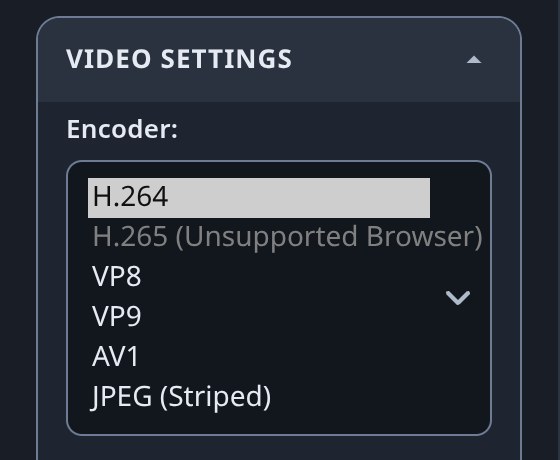
The server probes the hardware at startup and only offers what it can serve. The client then probes its own decoders per codec, and anything the browser cannot decode is greyed out in the sidebar with a note that it is the browser's limit, not ours. Chrome and Firefox on Linux decode no HEVC, for example. You will see it in the menu, disabled, and you will know why.
There is one fallback ladder and it is the same on both transports. If a codec cannot be served, either because the host has no encoder for it or the browser declines it, the session steps down. Hardware codecs come first, most efficient first (AV1, H.265, VP9, H.264, VP8), then software codecs by measured encode time (H.264, AV1, VP8, H.265, VP9), then striped H.264, then JPEG. Every step logs a reason. A codec the machine cannot serve never leaves you looking at a black screen.
One quality knob across all of them. SELKIES_VIDEO_CRF is still on the H.264 QP scale you are used to. VP8, VP9, and AV1 map to it through quantizer tables we measured against x264 on SSIM over a captured desktop, so CRF 25 means roughly the same visual quality whichever codec ends up on the wire. Paint-over, the secret sauce from the last post, works across every codec.
4:4:4 full color is still a first class citizen. H.264 and H.265 carry it on NVENC, VA-API, x264, and x265. VP9 carries it as profile 1. The server learns from pixelflux which of its encoders can do 4:4:4 on this host, and the browser tells the server which 4:4:4 profiles its decoder takes, so a full color stream is only sent where both ends can handle it. Elsewhere you get 4:2:0 and the stats panel says so. AV1 hardware still does not do 4:4:4, so that caveat from April stands.
Every encoder is tuned for latency, not for Netflix. Infinite GOP with keyframes only on request. No B-frames, no lookahead, one frame or less latency, parameter sets on every IDR, CBR with a 1.5 frame VBV or constant QP. The specific settings were picked by measurement. VP9 at speed 8 with screen tuning and one tile column per 256 pixels takes a third off its encode time for under three percent of bitrate. SVT-AV1 at preset 11 with rtc=1 is a quarter faster than preset 10. NVENC preset P3 encodes an H.264 frame in 3.7 ms against 5.2 ms at P4 on a V100 for a thousandth of SSIM. All of this is in the pixelflux docs if you want to argue with it.
Color is finally right everywhere. Every session converts and declares BT.709, with chroma sited at the block center so subpixel antialiased text does not tint. On NVENC we ship a tiny CUDA PTX kernel that the driver JIT compiles at runtime, because NVENC's fixed function color conversion weights columns 3:1 and it made text look wrong. No CUDA toolkit required. VP8 stays BT.601 because Firefox ignores out-of-band color signaling for it and inverts the shift. Yes, we measured that too.
2. Pixelflux 2: one Rust pipeline for both display servers
Pixelflux 1.x was a C++ module for X11 loaded through ctypes and a separate Rust crate for Wayland. Pixelflux 2.0 merged those into a single Rust extension built on PyO3, about 52,000 lines of it, with one shared encoder pipeline for X11 and Wayland. The rule written into the code is that a viewer must never be able to tell which backend produced a frame.
What that consolidation bought us:
- No more system library roulette. libyuv, libjpeg-turbo, libev, libXcursor, and libXcomposite are gone, replaced by pure Rust crates or vendored static builds. The X11 side talks XCB directly through x11rb.
- NVENC loads at runtime. No CUDA toolkit at build time, no toolkit in the container. The NVIDIA libraries are loaded with
libloadingand the API version is negotiated from 13.0 down to 10.0 depending on your driver. - Multi-GPU NVENC actually works. On drivers 570 through 595, NVENC would throw
UNSUPPORTED_DEVICEwhen a container could see a GPU it could not reach. Pixelflux now patches theioctlsymbol inside the NVIDIA libraries only, not process wide, to filter the GPU list. NoLD_PRELOADshim, no wrapper script. - Frames cross into Python with zero copies. A buffer protocol class gives the Python side a
memoryviewof the encoded frame on CPython 3.9 through 3.15. - Threads are prioritized. Capture and compositor threads run at nice -15, encode and delivery at -10, and where the container refuses
setpriorityit asks rtkit. - Lost frames get repaired without a keyframe. When a client reports a lost frame, the server tells that display's encoder to drop it from its reference list and keep predicting past it. Other viewers of the same session see nothing. This works on NVENC and x264 today. It is the difference between a hiccup and a keyframe storm on a shared session.
- Threaded H.264 striping shaved about 30% off frame delivery latency in the software path while adding 10% in server load.
On the platform side, two new encoder backends landed that I did not expect to care about and now do:
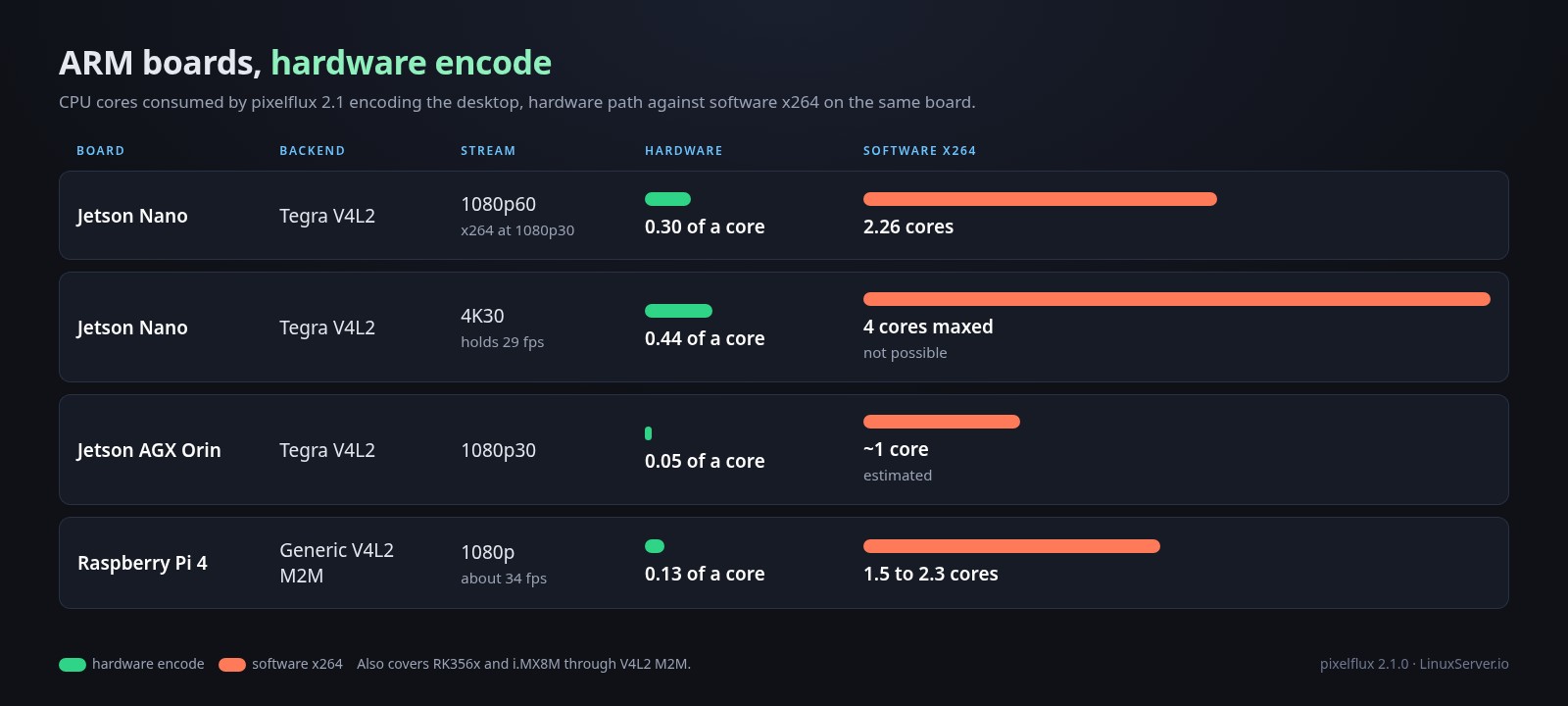
- Tegra/Jetson through the vendor V4L2 stack. On a Jetson Nano, 1080p60 costs 0.30 of a core against 2.26 cores for x264 at 1080p30. 4K30 holds 29 fps on 0.44 cores. On an AGX Orin it is 0.05 cores at 1080p30. The color conversion is deliberately pinned to the VIC rather than the GPU because on a robot that GPU is what perception runs on.
- Generic V4L2 M2M for the Raspberry Pi 4, RK356x, and i.MX8M. A Pi 4 does about 34 fps at 0.127 of a core where software would eat 1.5 to 2.3 cores.
There is one caveat for our aarch64 images before anyone mounts in a Pi's /dev/dri and expects magic. Pixelflux can do this, but our containers will not pick it up on their own. GPU auto detection is scoped to x86_64 in the baseimage, on purpose. On ARM the spread of boards, kernels, and vendor stacks is enormous and almost none of it has been through our hands, and a GPU that gets picked up automatically and then fails to initialize takes the whole desktop down with it. So on aarch64 you opt in with AUTO_GPU=true or point DRI_NODE at the device yourself, and if it does not work you have a working software desktop to fall back to instead of a container that will not start. More in section 19.
Pixelflux is also doing a lot of things that are not "encode a screen" anymore. It hosts the virtual camera, the Computer Use API, the kernel gamepad devices, an in-process fragmented MP4 recorder, and the stats reporter. More on each of those below.
And for the license lawyers, the software encoders are a build time property of pixelflux, never a Selkies setting. PIXELFLUX_ENABLE_GPL=0 builds with OpenH264 and kvazaar instead of x264 and x265. Our official wheels are GPL enabled. There is a license inventory and a CI gate for both builds.
3. X11 is dead. Long live X11.
I said X11 was on life support in April and that the Wayland stack offered every benefit. Then we went and gave the X11 stack a GPU with zero copy support.
Here is the story. We replaced Xorg's Xvfb in every image with XLibre's Xvfb, built from a pinned tag with two patches. The first makes the screen pixmap live on the GPU so glamor renders there and DRI3 presents there. The second gives the server spare RandR outputs, each with its own CRTC, that stay disconnected until a client plugs them in.
With the framebuffer on the GPU, pixelflux 2.1 added a DRI3 zero copy blit capture for X11. Pixelflux allocates a pool of GBM dmabufs on the render node, hands them to the X server as pixmaps with PixmapFromBuffers, and each frame is one CopyArea of the root window, which is a single GPU blit in glamor. NVENC or VA-API import the dmabuf in place. The cursor and watermark are composited by the server through Render. Damage drives the frame timing, so a repaint reaches the encoder in 3.8 ms instead of 8.8 ms on an RTX 5000 Ada at 1080p60. This works on any GPU vendor, and multiple containers can share one card.
On NVIDIA there is a second path: NvFBC. The NVIDIA X driver composites the screen into video memory and the buffer is registered with NVENC directly. On a Tesla V100 at 1080p that is 2.51 ms per frame for H.264 against 5.24 ms over shared memory, with host CPU under 0.2 ms per frame. It also means sessions run on X servers that report no display device at all, which is how you get a desktop out of a headless P100 in a datacenter.
Here is the part I need you to read twice. NvFBC does not happen in a LinuxServer.io container. It needs a real X.Org server running the proprietary NVIDIA X driver, and that server takes exclusive ownership of the GPU. One card, one container, and if a host session or another container already holds the card it fails. Our baseimage never launches X.Org. Every one of our X11 images runs the XLibre Xvfb described above, so on our images the NVIDIA path is DRI3 like every other vendor, and the card is shared. We are not going to wire up X.Org on our side because the failure mode, a user starting two containers and losing their desktop, is exactly the kind of support ticket we exist to prevent. If you want NvFBC, that is what upstream's docker-selkies-glx-desktop is for, and it does it properly.
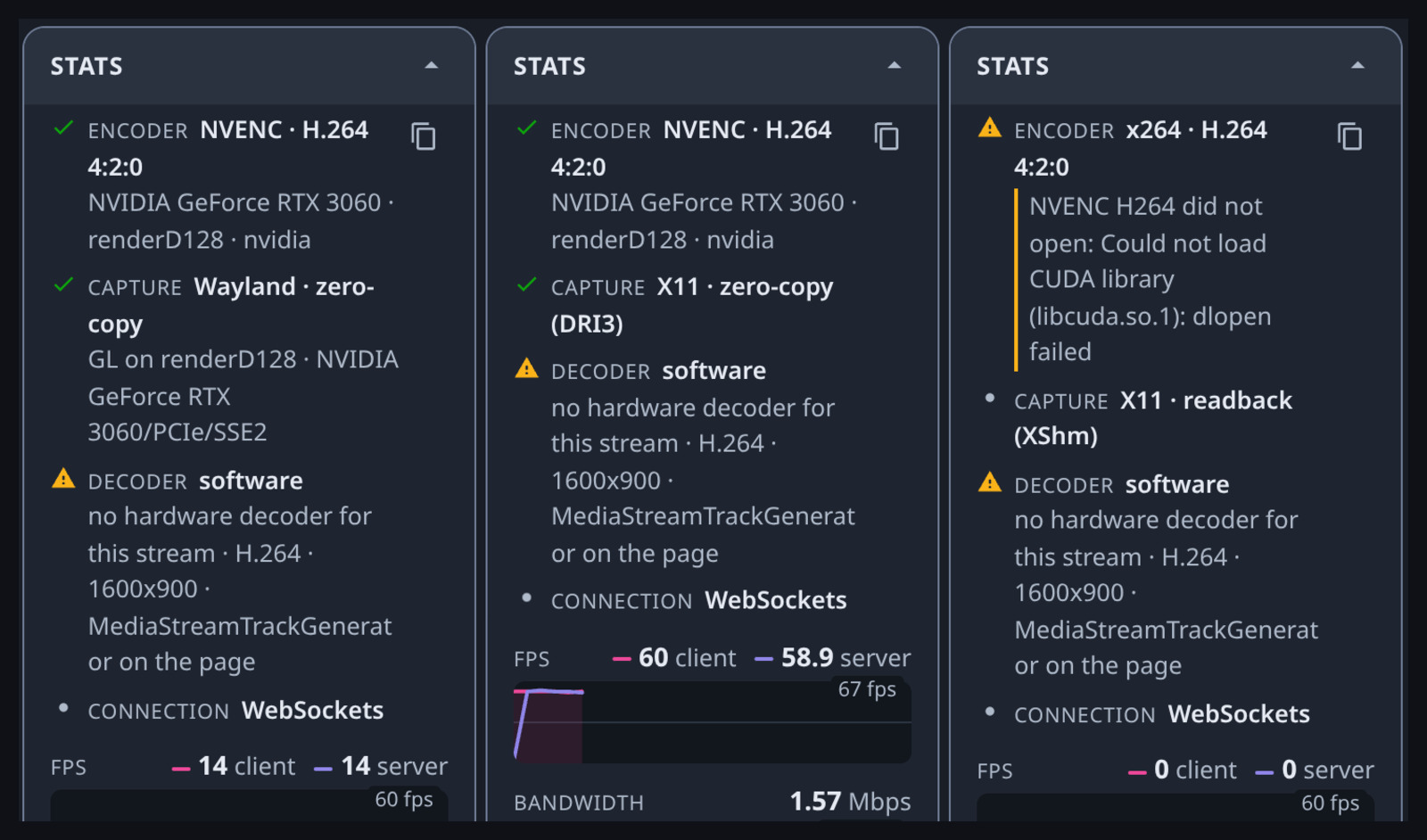
Pixelflux picks between NvFBC, DRI3, and the old XShm path automatically. If it declines a zero copy path it tells you why in the stats panel. Nothing to configure, and that is the theme of this release. Mount the card in and we figure out the rest.
So is X11 dead? For us, the Wayland stack is still the default on the KDE and LXQt Webtops and every single application container. But the X11 desktops, XFCE and MATE and the Debian KDE image, now get real GPU rendering and zero copy encoding too. The old Zink hack is gone. The old 16K framebuffer hack is gone. MAX_RES is gone. If you are on X11 for a reason, you are no longer a second class citizen. That is a nicer place to be than "let it die."
4. WebRTC, properly this time
The 4.1 post spent a lot of words explaining why we use WebSockets and not WebRTC. That is all still true and WebSockets is still the default. But there are real deployments on lossy Wi-Fi, mobile networks, and hostile corporate links where UDP with loss recovery wins, and in 2.0 WebRTC is no longer the bolted on GStreamer thing it was in 1.x.
The whole WebRTC stack is now a vendored fork of aiortc living inside the Selkies tree, with a vendored aioice next to it, because the project got tired of working around upstream and wanted to change things in place. Encoded frames from pixelflux go straight into RTP packetizers for every codec. That is RFC 6184 for H.264, RFC 7798 for H.265, RFC 7741 for VP8, RFC 9628 for VP9, and the AV1 RTP payload format with dependency descriptors. Same encoders, same paint-over, same quality knob. The browser's own RTP receiver decodes.
Things that make this a real transport rather than a checkbox:
- A pacer with strict priorities. Audio and RTCP go first, then the data channel, then video, with an IDR aware video queue budget and a GOP reset recovery when a group of pictures has outlived its usefulness.
- FlexFEC that adapts to measured loss, with one repair packet per group under 2% loss, two under 8%, three above.
- Loss repair without keyframes, the same reference invalidation trick as WebSockets, triggered by a second NACK for a packet the sender still holds.
- Optional congestion control (
SELKIES_CONGESTION_CONTROL=true) that steers the CBR target from transport wide congestion control feedback, GCC style. Off by default because most of you are on a LAN and want quality, not a bitrate estimator second guessing you. - Live codec switching without renegotiation. The offer lists the display's codec first and the rest of the ladder behind it. Change encoders mid session and each peer's payload type flips to what it already negotiated.
- Network options that make firewalls tolerable. A single shared UDP port and/or TCP port for every session (
SELKIES_WEBRTC_UDP_MUX_PORT,SELKIES_WEBRTC_TCP_MUX_PORT), with sessions told apart by ICE ufrag. ICE-TCP means clients on UDP blocked networks can connect over 443. ICE-lite, a port range, a public IP override for static NAT, and a Cloudflare TURN option. - Opus RED redundancy on by default with a distance of 2, and 10 ms audio frames.
- Coalesced pointer motion rides its own unordered data channel with sequence numbers, so a stale position is dropped instead of queued behind a frame.
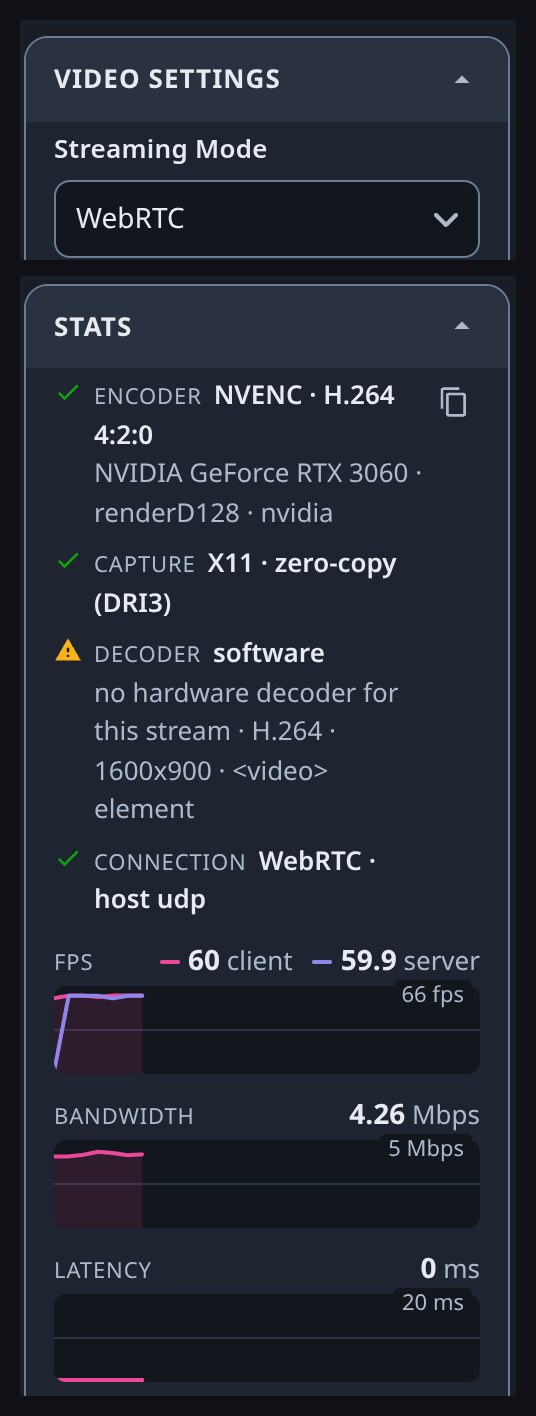
Since WebRTC needs settings, it is activated by env variables. Set any TURN or STUN variable, or SELKIES_MODE=webrtc, and the container starts in WebRTC with a transport switch in the sidebar. Flip between WebSockets and WebRTC mid session and the same encoders, menu, and input handler carry over. Compare them yourself on your own network.
5. The client got out of its own way
The web client, selkies-web-core, was rebuilt so that the page thread is no longer in the media path. The socket is read in a Worker. Video frames go to a video worker that decodes with WebCodecs VideoDecoder, composites stripes when we are in a striped mode, and presents. Audio is decoded in a worker and played through an AudioWorklet. The microphone is Opus encoded in a worker. Your React sidebar re-rendering cannot drop a frame anymore.
Presenting the decoded frame has a priority list. First is a VideoTrackGenerator inside the worker whose track is handed to a <video> element, then Chromium's page side MediaStreamTrackGenerator, then an OffscreenCanvas in the worker, then a plain canvas as the last resort. Where the browser allows it the frame is painted without a copy.
Codec strings are now read from the actual bitstream, the H.264 and H.265 SPS and the AV1 sequence header, instead of guessed, which killed a whole class of "decoder configuration" bugs. And if a hardware decoder accepts the stream and then produces nothing, a driver level fault the browser only reports after it starts, the client switches to software decoding instead of dropping you to a worse encoder. It remembers that choice per browser build and re-probes after a browser update.
Some small things add up. JPEG stripe decoders are raced at startup because Firefox is fastest with ImageDecoder and Chromium with createImageBitmap. Silent audio sends nothing at all, which saves 100 packets a second per client. A decode backlog of six frames lasting a quarter second is treated as overload and acted on.
For the operators, the sidebar is now fully brandable and every section can be hidden with a SELKIES_UI_SIDEBAR_SHOW_* flag, with the capability behind it governed separately so hiding a control never silently disables a feature. Two dashboards ship, the classic React one and the shadcn "wish" one, both restyled, both in 18 languages.
6. The stats panel, or "why is it slow"
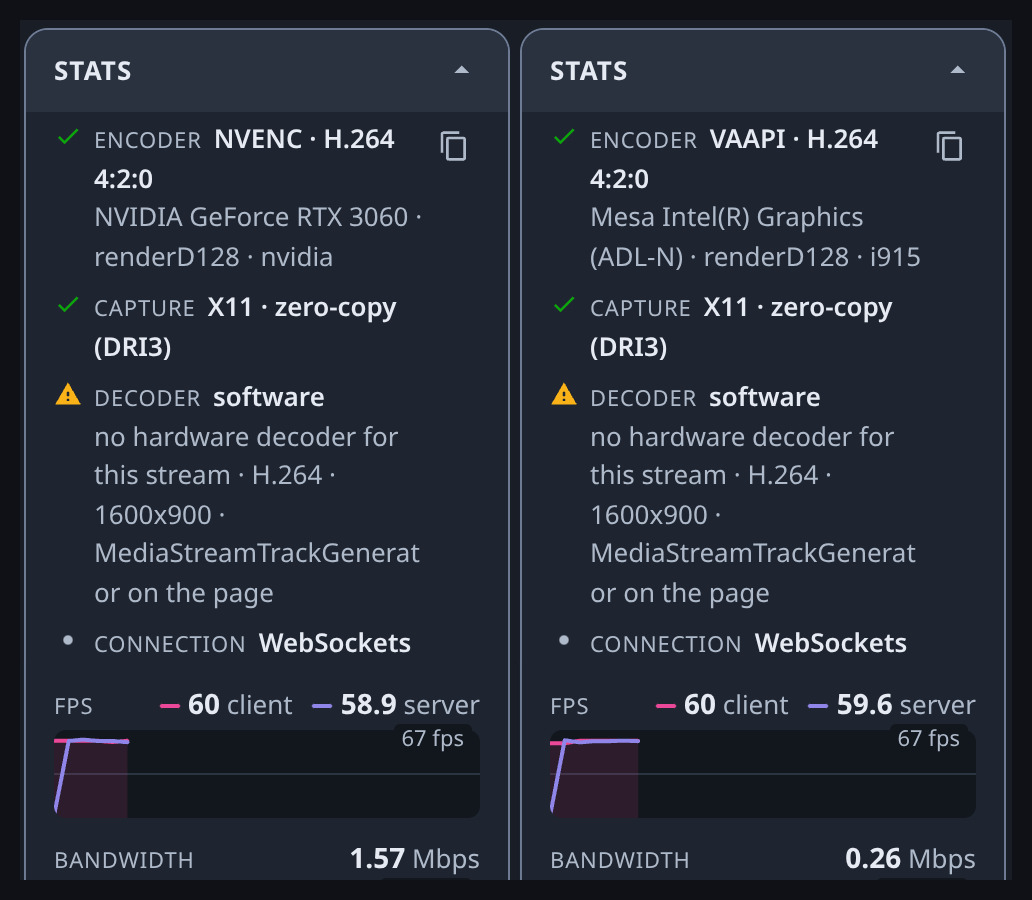
Every support thread we have ever had starts with the same three questions. Is it using the GPU? Is it zero copy? Is the browser decoding in hardware? The stats panel now answers all three in its first four rows, with a reason underneath whenever the session got less than it asked for.
- Encoder: NVENC or VAAPI with the GPU, render node, and kernel driver, or the software library name. Software on a box with no GPU is an ordinary deployment and carries no warning. Software on a box that has a GPU tells you why the hardware session did not open, whether that is a render node the user cannot open, a missing
videodriver capability, or a codec the card has no engine for. - Capture: DRI3 on X11 (NvFBC on upstream's GLX image), the compositor's own buffers on Wayland, and whether frames reach the encoder without a copy. If a zero copy path was declined, it lists what each one was declined for.
- Decoder: whether this browser decodes in hardware, and on what evidence.
- Connection: the transport, and on WebRTC whether you are direct, relayed through TURN, or on TCP.
There is a copy button that dumps all of it as text. That is what we want pasted into issues from now on.
Below the rows are the graphs, covering frame rate, encode time from pixelflux's own per frame timestamps, decode time, round trip, bitrate, host CPU and memory from the container's own cgroup, and GPU utilization read in-process through NVML on NVIDIA and through DRM fdinfo on AMD, Intel, Mali, Adreno, and VideoCore. None of it is sampled or sent unless the panel is open. A session nobody is inspecting has zero stats overhead, and shared viewers never receive it.
7. Dual monitors, first class
Multi monitor has existed in our stack since last September, but it was a hack layered on the 16K framebuffer and it never worked on the Wayland backend. In 2.0 it is a proper feature on both.
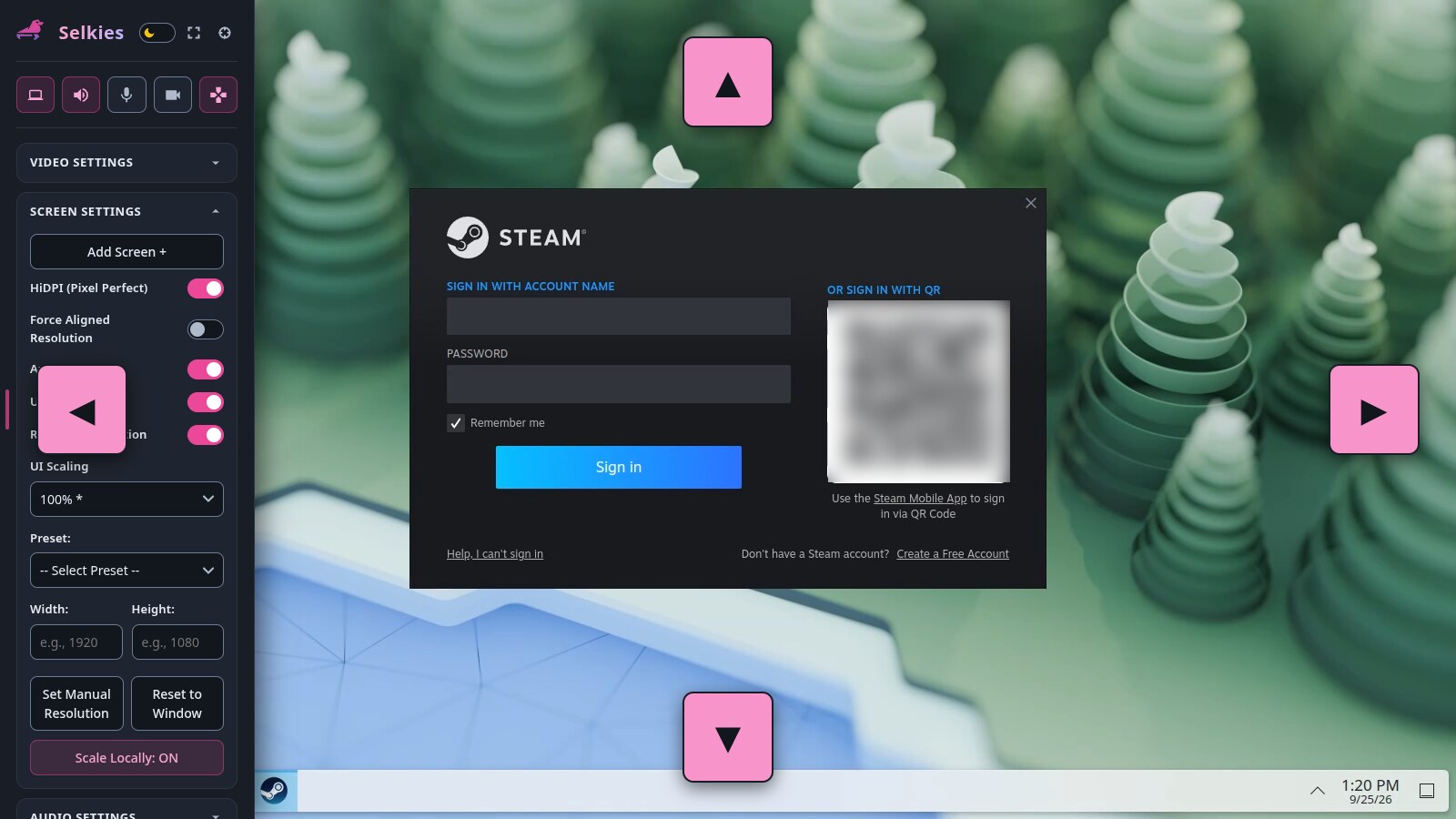
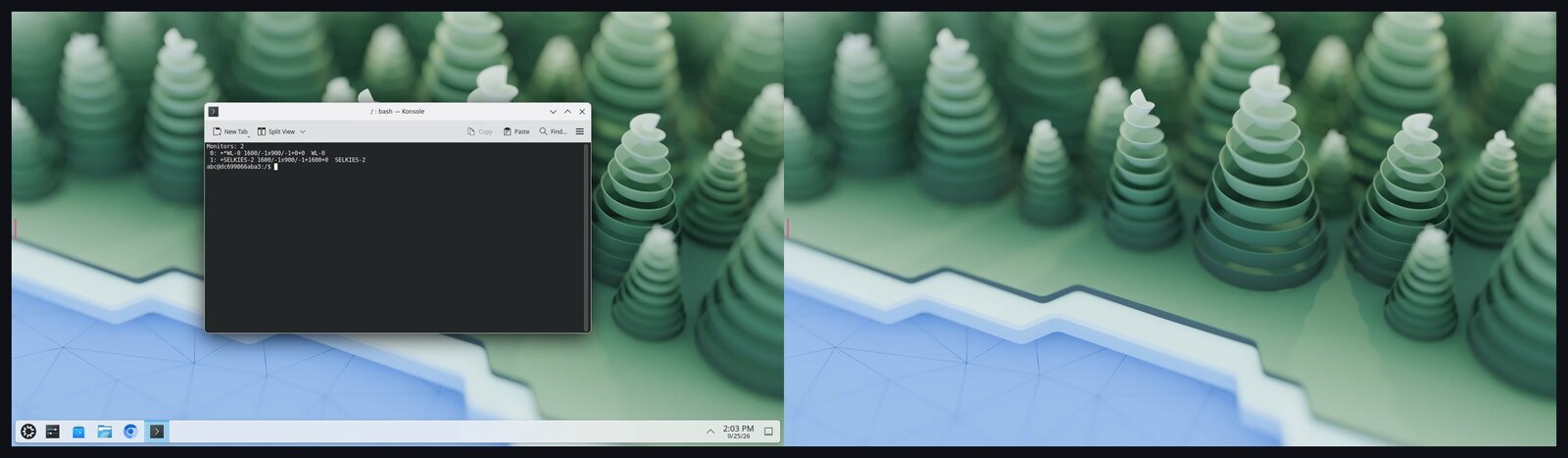
Click Add Screen in the screen settings and a companion browser window opens that joins the session as a second display at its own resolution and its own pixel density. Drag it to your other physical monitor. Close it and the display is unplugged. Pointer lock spans the whole desktop so a locked cursor walks across onto the second screen, and a held drag crosses between displays even when they have different scales.
- On Wayland, the capture compositor creates outputs on demand and the nested desktop follows them. labwc is patched to add and remove outputs at runtime. For KDE we ship a patched KWin that turns
zkde_screencast_unstable_v1virtual output requests into real outputs when nested under pixelflux, so Plasma treats the new screen exactly like a plugged in monitor and you get the KDE display settings dialog, the panel placement, all of it. - On X11, each extra display is a real RandR output with its own CRTC, plugged and unplugged per client thanks to the XLibre Xvfb patches. Your window manager sees a monitor appear, not a bigger framebuffer. Where an X server has no spare outputs there is a fallback to RandR 1.5 logical monitors.
- Mixed DPI works on Wayland. Each display scales to its own page's density, so a Retina laptop next to a 1080p external monitor renders each at native pixels.
8. A webcam in every container, in userspace
This one I am proud of. Every Selkies container now has a virtual camera, and the browser's webcam publishes into it, with no v4l2loopback kernel module, no device node, and no extra privileges.
It works the same way our gamepads have always worked. An LD_PRELOAD interposer, selkies_v4l2_interposer.so, presents /dev/video0 to applications and serves frames from a shared memory ring that pixelflux's VirtualCamera fills. It has been tested against Chromium, Firefox, ffmpeg, GStreamer, v4l2-ctl, OBS, and generic libv4l2 applications. If you do have v4l2loopback or PipeWire available, pixelflux can publish to those too.
The uplink is encoded in the browser with WebCodecs and pixelflux decodes it off the GIL, so Python never touches a frame. The codec is measured per client, in the order H.264, VP8, VP9, AV1, H.265, then JPEG for Firefox, which lacks MediaStreamTrackProcessor. Yes, you can deliver your webcam into a container as AV1. Phone rotation is handled.
The detail that makes it feel right is demand mode. Set SELKIES_WEBCAM_ON_START=demand and the browser only asks for your camera while an application inside the desktop actually holds the device open, releasing it a couple of seconds after the last one lets go. Same for the microphone. Your camera light follows what the remote desktop is doing, not whether the tab is open. Every ask and release is logged and hits the audit webhook.
Webcam is off by default like the microphone, and it needs HTTPS like everything else. NO_WEBCAM=true removes it from the container entirely.
9. Gamepads: the interposer grew up
The joystick interposer is now the input interposer, selkies_input_interposer.so, and it does a lot more than fake /dev/input/js0. The old name is kept as a symlink so nothing you built breaks.
- Real kernel gamepads where the kernel is reachable. If
/dev/uinputis writable, Selkies registers each of the four slots as a real evdev device instead of interposing. Steam, Proton, and browsers inside the desktop see a real controller with nothing preloaded. - App created uinput devices in containers without
/dev/uinput. Steam Input creates its own virtual controller by opening/dev/uinput. The interposer now serves that too, so Steam Input works in an unprivileged container. - Hotplug without udev. The interposer shadows
inotifyon/dev/input, so an application that watches the directory sees a pad appear when a player joins and vanish when they leave. - fake-udev passes everything else through. It used to hide the real libudev. Now it loads the real one by path and only adds our pads on top, which is what fixed nested KWin losing its GPU under the preload.
- Rootless Podman works. If
mknodfails wetouchthe device paths instead and the interposer takes it from there. - Publish input devices.
SELKIES_PUBLISH_INPUT_DEVICES=truemirrors the session's keyboard and pointer as evdev devices too, for games and remappers that read evdev directly. - Emulator configs in Eden, Azahar, xemu, Cemu, and Dolphin were migrated for the new gamepad identity so existing bindings keep working.
Gaming mode itself (Ctrl+Shift+X) now fullscreens, locks the pointer, and locks the keyboard so a game receives Escape and Alt+Tab instead of the browser. Keyboard Lock is a Chromium only API and Brave's Shields block it by default, so the client tells you when it entered gaming mode without it. Raw pointer motion asks the browser for unaccelerated movement under lock, off by default on macOS, where the acceleration curve is what gets your hand across the screen.
10. Steam in any container, no privileges required
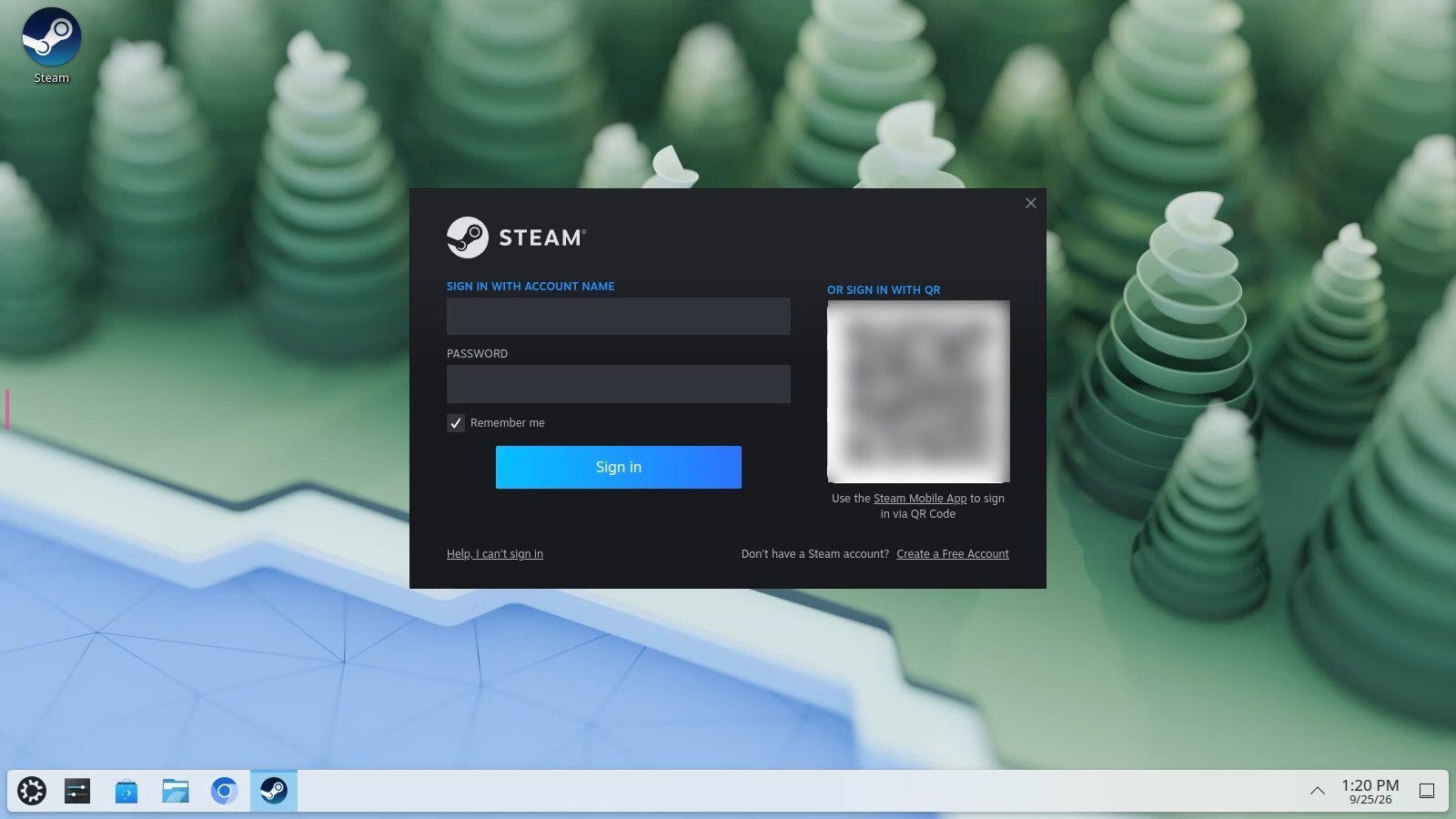
Type steam in the terminal of any glibc based Selkies container and you get a native Steam install, with a Steam entry in the desktop menu when it finishes. No --privileged, no --cap-add, no seccomp=unconfined, no special Docker flags.
Under the hood a shim runs a native package install through the container's passwordless sudo (the deb on Debian and Ubuntu, RPM Fusion on Fedora, the Arch package on Arch), enables i386, pulls the 32 bit graphics runtime, and wraps the launcher so it:
- preloads the 64 and 32 bit input interposers and fake-udev so Steam and every game see the four virtual pads.
- swaps bubblewrap for
proot-bwrap, our stand in for containers without user namespaces, so Steam's pressure-vessel runtime works. - watches your
steamapps/common/*Proton*directories and drops auser_settings.pyinto each Proton install so Proton games inherit the interposers too.
The install lives in the container layer, so after you recreate the container you run steam once more and it reinstalls in a minute. Your library in $HOME/.steam persists like everything else in /config. It needs x86_64 and passwordless sudo, so HARDEN_DESKTOP and DISABLE_SUDO block it, and NO_STEAM=true removes the shim entirely.
This is exactly why we did the interposer work above. Steam Input, Proton, SDL, they all just find controllers.
11. Printing through the browser
The session has a printer named Selkies. Print to it from any application and the document opens in your browser's print dialog, ready for whatever printer your laptop can reach. Each printed document also lands in the sidebar's new printing section where you can print it again or save it as a PDF. On phones and tablets, where no browser prints a PDF from a frame, you get a notification with an Open link that hands the document to a new tab.
Behind that is a CUPS scheduler that Selkies runs itself, as the session user, from a copy of cups-daemon with the cups-filters chain that turns whatever an application prints into a PDF. It keeps its state under the runtime directory, needs nothing in /etc/cups, and needs no privilege. SELKIES_PRINTING_ENABLED=false turns it off and HARDEN_DESKTOP does so by default.
12. Webstation, RomM, and couch co-op in a browser
Webstation was introduced in April as an emulation focused Selkies Desktop image. It has since grown a second tag that is a whole project of its own.
romm-broker is a companion to RomM, the self hosted ROM manager. Pull lscr.io/linuxserver/webstation:romm, point RomM at it (the quickstart walks through it), and every game in your library gets a Play button that launches the right emulator in a Selkies session and hands you a link. The broker, written by Zach Clendenen and built from nothing since August 3rd, does the boring parts. It resolves the ROM, restores your save from RomM, launches the emulator, mints Selkies tokens, and on exit saves state, zips the save delta, and pushes it back to RomM. RomM holds every save, so the containers are disposable. A brand new container picks up exactly where you left off.
The interesting part is the collab room. The host gets Player and Viewer invite links. Four virtual gamepad slots by default, one mouse and keyboard token, and up to 32 viewers. The host drags numbered gamepad icons onto people's video tiles to hand out controllers live, without pausing the game, and Selkies enforces on the server that each connection can only drive its slot. There is chat, webcam and mic tiles (WebCodecs VP8 and Opus in Web Workers over the room's own socket, with a designated speaker mute enforced server side), a resolution lock, and Gaming Mode with pointer and keyboard lock for FPS mouselook, all in eighteen languages.
There are fifteen launchers, RetroArch (70 platforms across about 49 cores, auto downloaded), PCSX2, DuckStation, Dolphin, PPSSPP, Cemu, Azahar, Eden, shadPS4, RPCS3, xemu, Xenia, ScummVM, Flycast, and a bare desktop for one time BIOS and controller setup. Whole memory card sync for PS2 and GameCube. Cross emulator save imports. Save state thumbnails come from a pixelflux screenshot.
There are some genuinely funny engineering stories in here. RetroArch has no "save to slot N" command so the broker steps the slot counter down 24 times and back up. Flycast can only be made to write its state by closing its window, so the broker sends Alt+F4. xemu saves live inside a FATX filesystem inside a qcow2 image and get extracted with a Python FATX library. ScummVM's menu key had to move to F11 because Ctrl chords do not survive Xwayland injection. New broker releases flow into the image automatically through our external trigger pipeline with no manual step. The whole thing is 413 commits and about 2,000 tests in seven weeks. Full docs at romm-streaming.github.io/romm-broker, and the quickstart gets you from zero to a Play button.
13. Collaboration, secure mode, and the operator's toolbox
The sharing links from 1.x are still there, #shared for a viewer and #player2 through #player4 for people who get a gamepad slot and nothing else. What changed is that input authority is enforced on the server on both transports. A modified client cannot exceed its role. A viewer's keyboard and mouse messages are refused whatever it sends, and its gamepad messages are refused unless they drive its own slot.
For orchestrators there is secure mode. Set a master token and the server stops accepting a shared login. An orchestrator posts a token table to /api/tokens, each entry carrying a role (controller or viewer), a gamepad slot, and optionally mk_control to hand keyboard and mouse to exactly one token while everyone else goes read only. The table is reconciled live. A token that disappears is disconnected, a slot change is pushed to the client without a reload, and no client streams until the first table arrives. This is what Sealskin and romm-broker build on, and it is what makes "drag the gamepad icon onto a player's tile" possible without pausing the game.
Around that, an operator API grew under /api:
- list connected pages with their role, slot, display, and round trip, and kick one.
- start and stop a recording, which pixelflux writes as a crash safe fragmented MP4 with the session's audio muxed in as an Opus track without transcoding and without a byte passing through Python.
- take a screenshot of any display with the cursor drawn in.
- scrape Prometheus metrics.
And an audit webhook. Point SELKIES_AUDIT_WEBHOOK_URL at a collector and every clipboard transfer, file upload and download, printed document, connection, disconnection, recording, and camera or microphone demand event is posted as JSON, metadata only, never content. The queue never stalls the stream. This is the feature the "we would love to deploy this but compliance" people have been asking for, contributed by Dominik.
Other security defaults were tightened while we were at it. The server listens on loopback unless told otherwise, basic auth refuses to start without a password, cross origin WebSocket hijacking is blocked by an allowed origins list, command_enabled is off upstream, and there is a second view only basic auth password for the simple case where you just want to share a stream with someone.
14. Clipboard and files, paced like everything else
The clipboard carries formatted content now. HTML travels alongside plain text in both directions on X11 and Wayland, so a paste into a rich editor keeps its styling and a paste into a terminal gets text. Both dashboards have send, receive, and seamless switches per browser. Turn seamless off and the sidebar box becomes the only path. Large X11 transfers use INCR, and both display servers use event driven monitors instead of polling.
File transfers are paced against the video stream using an end to end round trip gauge with LEDBAT style base delay history, measured all the way to the browser so a reverse proxy absorbing writes cannot hide congestion from the server. A big upload does not stall your session anymore. SELKIES_FILE_TRANSFER_LIMIT_MBPS adds a hard cap for operators who want one, and viewers cannot upload at all.
15. Stream a desktop you already have
This one is more for the upstream Selkies audience than the container crowd, but it is a big deal. Pixelflux can now capture an external Wayland compositor instead of running its own. Point --wayland-host-display at a running wlroots, KWin, or COSMIC session and frames come through ext-image-copy-capture-v1 into GPU buffers pixelflux allocates, zero copy. On GNOME and older KDE it goes through the xdg-desktop-portal ScreenCast and RemoteDesktop interfaces with PipeWire frames imported in place. GNOME asks for consent once and the restore token is kept. Input is injected through libei, virtual keyboard and pointer protocols, uinput where available (about 12 microseconds to evdev), or the portal, in that order.
Combined with the new AppImage and native packages, running pip install selkies on your actual workstation and streaming your real desktop to a browser is now a thing that works.
16. Pelorus: Some AI bullshit no one asked for
Pelorus is the newest member of the family and it is preinstalled in every Selkies baseimage. It is an agentic interface that lets a language model drive the Linux desktop, and the trick is that it mostly does not look at pixels. It exists because I wanted to prove out a better way to build a computer use chatbot, with two jobs in mind, desktop CI and eventually helping people who cannot see a screen use a computer.
That second one needs some explaining, because an agent living inside a container is not much help to a blind user today. I take sidequests to get a ball rolling, and this was one of them. While building Pelorus I wanted to know what using a desktop with a screen reader is actually like, so I put on a blindfold, turned one on, and tried to do basic things. It is rough. You mostly sit there pressing tab while a flat robotic voice reads the same labels back at you over and over, and the simplest tasks in a modern application take forever. If a chatbot is going to be useful to anyone, it should be useful to those users.
The problem with doing it the way everyone else does is that I could not get it to work. Early on I tried the off the shelf computer use APIs from the big vendors, and none of them could look at a screenshot of a desktop and reliably produce click coordinates that landed on the thing they meant. Most of them also cap the image somewhere around 1024x1024, so a real desktop gets downsampled, the aspect ratio changes, and small controls vanish before the model ever sees them.
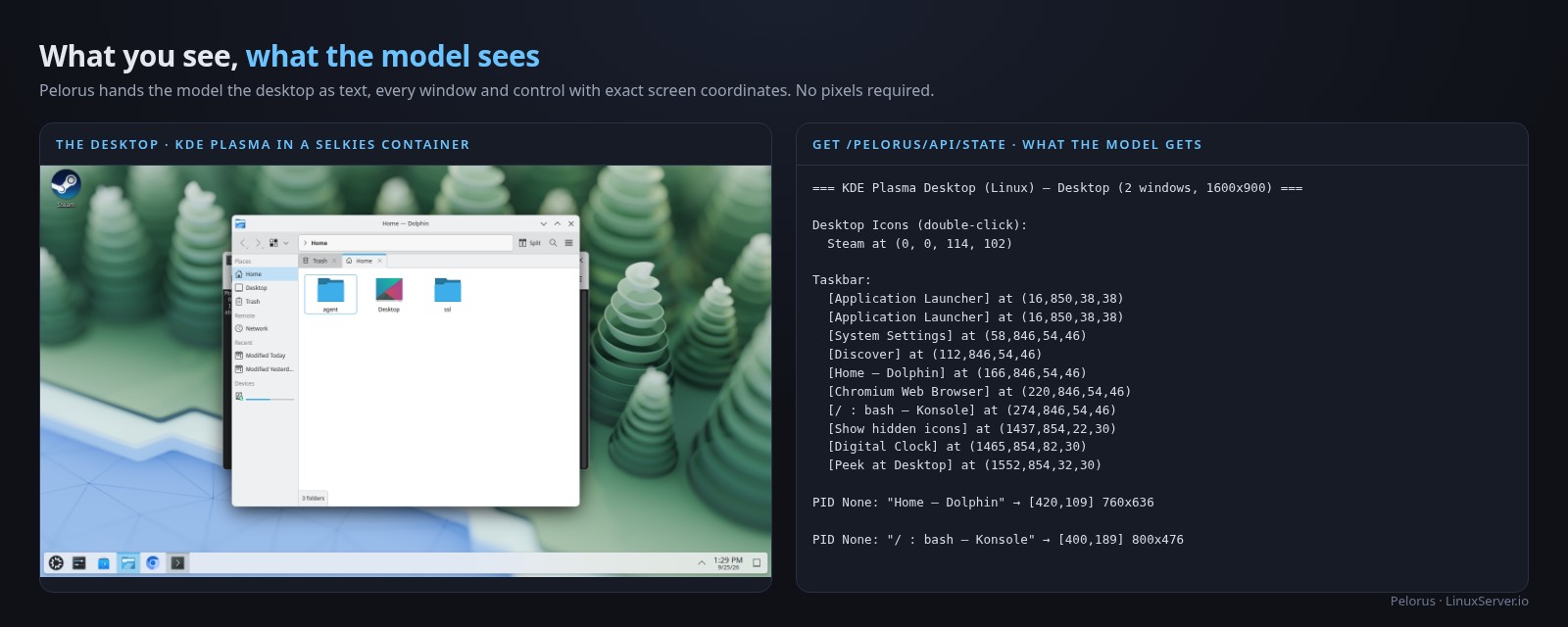
So Pelorus feeds the model the desktop as text instead. It reads the accessibility tree over AT-SPI, plus window geometry from labwc's IPC socket or KWin's D-Bus, and hands the model every window, button, and menu entry with its exact click coordinates. The model drives the desktop like an old choose your own adventure text game. It reads the room, picks an action, and reads the room again. There is no guessing at pixels, so there are no mix ups, and even low end local models pull off tasks that were flatly impossible from a screenshot. Screenshots are still there as a fallback for games, some Electron apps, and custom OpenGL interfaces that expose nothing over AT-SPI.
Set PELORUS=true on any Wayland container and you get a FastAPI server behind nginx at /pelorus/ with a chat UI, an observe-infer-act loop with a step budget, and a REST API (POST /api/run to hand it a task, GET /api/state for the text desktop, POST /api/desktop/control for raw input). Providers are Ollama by default, any OpenAI compatible endpoint, or Gemini. The default model is gemma4:12b pointed at localhost:11434, so pair it with the LM Studio container or an Ollama instance and everything stays on your hardware.
Underneath Pelorus is pixelflux's Computer Use API, an HTTP server that implements Anthropic's computer use action set, meaning screenshot, mouse move and click and drag, type, key, hold key, scroll, zoom, cursor position, plus start and stop recording. It works on X11 through XTEST and on Wayland natively, binds loopback only, and you can enable it without Pelorus with PIXELFLUX_CU=<port> if you want to wire your own agent to it.
The use we built it for right now is CI. Every Selkies container is now something an agent can drive end to end with a plain English test. The use I hope it grows into is accessibility, with screen readers and assistive software getting a chat interface where someone can ask what is on the screen, get a real description instead of a tab loop, and tell the computer what to do in plain language. A lot has to happen before that is real, and most of it is outside this project, but the text-first approach is the part I wanted to prove works. There is a dedicated lscr.io/linuxserver/pelorus image, an Arch KDE desktop with the whole stack turned on, if you want to see it without touching your existing containers.
Treat it as what it is, an unauthenticated root of control over the session. It lives behind nginx and its ports should never be exposed directly.
17. PRoot Apps: 109 apps, NVIDIA, and an AI shelf
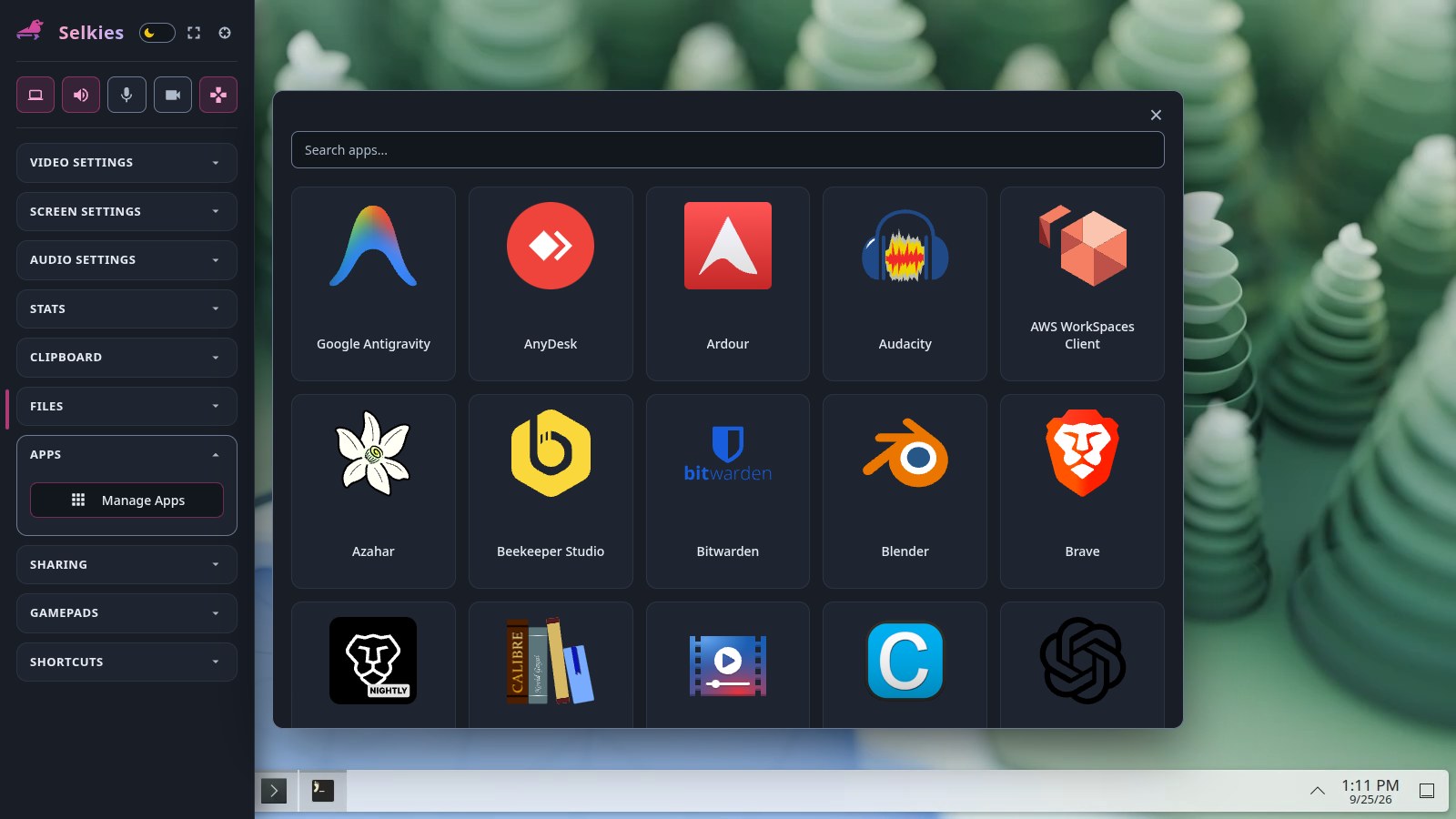
PRoot Apps is the userspace app store inside every container. Run proot-apps install firefox or click it in the sidebar, and it lands in your persistent home directory with no root and no rebuild. It went from 92 advertised apps at the last post to 109, 61 of them on arm64, and picked up some capabilities that were on the "never" list.
NVIDIA works now. proot-apps run does in bash what nvidia-container-runtime does in Go. It detects the host driver, bind mounts the exact driver userspace (libnvidia-*, libcuda, libnvcuvid, libnvoptix, the EGL/GLX/GLES vendor libraries, VDPAU, GBM, nvidia-smi) into the app's glibc library directory, and synthesizes the Vulkan ICD, glvnd EGL vendor file, and OpenCL ICD if the host lacks them. Nothing is packaged, nothing has to match. CUDA, NVDEC, OptiX, and OpenCL all come across. To make that useful, Blender, Chromium, Dolphin, Firefox, GIMP, Krita, melonDS, RetroArch, and Telegram were rebased from Alpine onto glibc bases. Blender now ships the official upstream build with OpenCL set up.
Every app image has the Selkies 2.0 interposers baked in, so gamepads and the virtual webcam work inside proot apps the same as in the container proper.
New since April, all installable as an unprivileged user in any container:
- Emulation: a full console lineup with Azahar (3DS), Cemu (Wii U), DOSBox Staging, DuckStation (PS1), Eden (Switch), MAME, PCSX2 (PS2), RPCS3 (PS3), ScummVM, xemu (Xbox), Xenia Edge (Xbox 360). shadPS4 is built but hidden until it is stable. Ryujinx was removed now that Eden covers Switch.
- AI: LM Studio, Claude Desktop, ChatGPT (with Codex), Google Antigravity, and OpenCode. Unsloth is built but hidden.
- Misc: Brave Origin, and the AWS WorkSpaces client contributed by Nicholas Buckingham.
On the platform side, the proot binary is now our own fork of the Termux patches, built static, with a second copy carrying CAP_SYS_PTRACE for hosts that restrict ptrace (the sidebar checks kernel.yama.ptrace_scope and explains a denial instead of failing silently). Bash completion with source <(proot-apps completion bash). Alpine 3.24 and Ubuntu Resolute bases. Prerelease tags cut on every commit for downstream ingestion. And there is a real release cadence again after two years without a tag, with 0.4.0, 0.5.0, and 0.5.1 in a month.
18. Sealskin 0.3
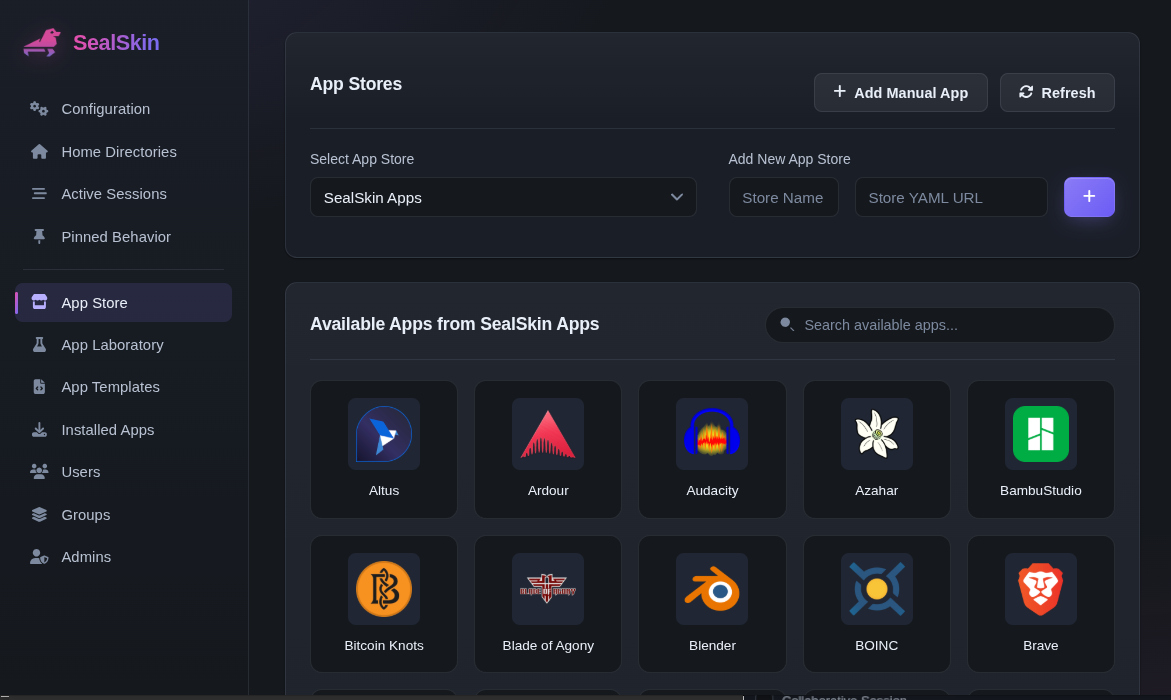
Sealskin, our orchestration layer that turns all of the above into a multi user VDI with a browser extension and phone apps, shipped 0.1.38, 0.1.39, and then jumped to 0.3.x in this window. The big one is 0.3.0, where the web client is now served by your own Sealskin server. The browser extensions and the iOS and Android apps became thin shells that load the UI from your instance, so a UI fix ships when you update the container instead of when an app store approves it. The interface was redesigned along the way, installed apps now follow their store definitions, the app catalog YAML reloads live, and the template schema moved to server data.
Along the way the collaboration rooms picked up the Selkies 2.0 features, meaning resolution control and gaming mode for collaborators, four gamepad slots with mouse and keyboard hand over, and application switching inside a room. App Templates grew categories for the new server side knobs, so you can turn on the Computer Use server, recording, or the audit webhook per app from the admin panel. 0.3.1 was a security hardening pass (regenerate any password protected public shares), and 0.3.2 fixed FPS gaming mode locks and audio resume.
The sealskin-apps catalog is at 118 entries. Everything from the container section below shows up there. Docs are at docs.sealskin.app.
19. The containers themselves
For the people who just pull images, here is what moved under you.
Distros. The base image lineup is now Alpine 3.24 (new), Arch, Debian Trixie, Fedora 44, Kali, and Ubuntu Resolute, all on x86_64 and aarch64. EL9, Alpine 3.23, and Ubuntu Noble were deprecated. There is a new dev tag that tracks the head of Selkies main on Resolute for people who want to see what is coming.
Webtop. Twenty one desktop tags plus dev. ubuntu-lxqt is new and runs Wayland by default on labwc. ubuntu-kde regained an X11 session. The KDE images run KWin with our patched build for dual monitors. The Kasm compatibility branch was retired in July.
selkies-layers. Compositors and patched components are no longer built inside each Dockerfile. They come from ghcr.io/linuxserver/selkies-layers: the patched labwc with a pinned wlroots, the XLibre Xvfb, the patched KWin, our wtype fork, and selkies-desktop, one per distro and arch. That deleted about 1,150 lines from the base Dockerfile and means an app image is now three Dockerfile lines and an autostart file.
Mount the card in. We figure out the rest. That is the whole GPU story for an x86_64 container now. Pass --device /dev/dri or the NVIDIA runtime and set nothing else. The container finds the render node, assumes AUTO_GPU=true, uses the first GPU for both rendering and encoding, which is the zero copy configuration, picks the encoder the card supports, and brings up hardware OpenGL through DRI3 on the vendor's own driver. Intel 10th gen and older get the i965 driver detected automatically. Multi-GPU hosts, mixed vendors, and containers with no GPU at all are handled the same way, without a config file. If you have a compose file full of DRI_NODE, LIBVA_DRIVER_NAME, and SELKIES_ENCODER from previous posts, you can delete most of it. On aarch64 that assumption is deliberately off. Mounting a render node does nothing until you set AUTO_GPU=true or DRI_NODE yourself, because most ARM boards are untested by us and we would rather hand you a working software rendered desktop than brick the container on a GPU that does not initialize. If your board works, tell us, and it can join the tested list.
Selkies Desktop, our tiny start menu and window manager panel for single app containers, now works in X11 mode over Openbox as well as Wayland. Now all our containers should look the same in X11 or Wayland mode where a minimal desktop is used.
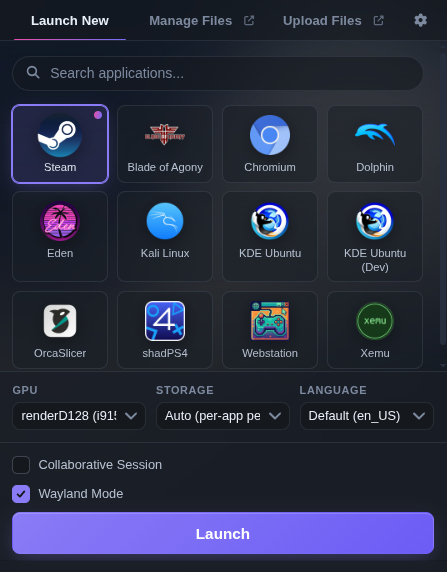
New images since April. lm-studio is an Arch container with LM Studio for running gpt-oss, Llama, Gemma, Qwen, and DeepSeek locally, on CUDA 13 (RTX 2000 series and newer) or Vulkan on AMD, bundled with Aider, Cline, Code-OSS, OpenClaw, and OpenCode so the model has something to do. It is a natural backend for Pelorus. pelorus is an Arch KDE desktop with the agent stack turned on and a split view, chat on the left and the desktop on the right. Webstation picked up Cemu, Azahar, and Xenia Edge and now runs on X11 too, plus the webstation:romm tag above. Chrome, RawTherapee, and OrcaSlicer gained aarch64 builds.


KasmVNC is gone. The last Kasm compatibility branches on Chromium and Firefox were retired in July. Of the 223 active LinuxServer.io image repositories, 94 are built on the Selkies baseimage and zero are built on KasmVNC. The migration that started with Webtop 3.0 is finished.
Robustness got a whole pass too. Stale locks and runtime state are cleaned after an unclean shutdown, there are PulseAudio readiness checks, the apt autoremove that broke packages is gone, gamepads work on rootless Podman, and the KDE 6.7 udev conflict that had us disable gamepads on arch-kde and fedora-kde is fixed so they are back.
Documentation for all of it moved off the individual READMEs to docs.linuxserver.io/selkies, with the configuration reference, GPU guide, security and hardening, reverse proxy, WebRTC, installing apps, and component pages. Every README shrank to the essentials and a "start minimal" command, because most support issues we see stem from large run configurations assembled from years of forum posts.
20. Selkies beyond Docker
For the first time Selkies is easy to run without a container:
pip install selkiesfrom PyPI, which pulls in pixelflux and pcmflux wheels for x86_64 and aarch64 on CPython 3.9 through 3.15..debfor Ubuntu and Debian,.rpmfor Fedora and EL9,.apkfor Alpine,.pkg.tar.zstfor Arch, each installing a private environment under/opt/selkieswith the interposers included.- A self contained AppImage with a glibc 2.28 floor that brings its own Xvfb and PulseAudio if the host has none. It works on a Jetson.
selkies-session, one command that brings up whatever the host lacks (sound server, Xvfb or compositor, a desktop from the XDG session directories) and Selkies behind one port. It is what powers the new Jupyter (pip install selkies[jupyter]), Coder (a Terraform module), and Open OnDemand (a batch connect app using secure mode) integrations, and it is documented for Apptainer on SLURM clusters.
And as covered up top, upstream ships its own reference images, the LXQt desktop and the EGL and GLX KDE Plasma desktops, if you want to see the stack with none of our opinions on top.
Odds and ends
Because "everything" means everything:
- Selkies 2.0 has a test suite. It did not in April. 125 unit, 52 integration, and 58 end to end Playwright suites running real Chromium, Firefox, and WebKit across WebSockets and WebRTC on X11 and Wayland, about 2,200 checks. CI counts a skipped suite as a failure.
- GStreamer is completely gone from the tree. supervisord is gone from the images. wtype, wl-copy, and wlr-randr are gone from the Wayland path, and everything is an in-process protocol call now.
- The frame rate range is 8 to 240. Audio defaults to 128 kbps Opus in 10 ms frames, with optional 5.1 and 7.1 through multistream Opus.
- Keyboard got correct multi layout typing on X11 through XKB group locking, a layout hint from the browser's own layout map, macOS Cmd optionally arriving as Super instead of Ctrl, a switch to hand every client shortcut to the session, and iOS and Android IME fixes.
- HiDPI has one meaning now. Turn it on and you get native pixels with the remote UI scaled. Turn it off and the client stretches. The DPI is read from the desktop at startup, including XFCE's from xfconf.
- Application cursors are delivered whole up to 128x128.
- Lifecycle hooks landed,
SELKIES_RUN_AFTER_CONNECTandSELKIES_RUN_AFTER_DISCONNECT. - Logging was unified. INFO reads as the story of a session, everything else is DEBUG.
- pcmflux is pure Rust now too, with libopus vendored and statically linked, reconnect with backoff across PulseAudio restarts, and an Ogg Opus socket that feeds the recorder or
ffmpeg -i unix:.... - The docs sites (docs.selkies.io, docs.linuxserver.io/selkies) serve every page as Markdown with an
llms.txtso your model can read them too. - Much of the Selkies, pixelflux, and pcmflux trees are now written and reviewed with coding agents, and the repos say so in their
AGENTS.md. The rules require measurements for any numeric claim, which is why this post has so many milliseconds in it. - Contributors who landed features in this window and deserve a name are Mohan J (the aiohttp migration and multi user WebRTC), Dominik (audit webhook), gutschke (camera and microphone on demand), Junker der Provinz (WebRTC port range, start muted, macOS pointer acceleration, container init fixes), Ryan Mounce, Vishal Kadam, and Zach Clendenen for essentially all of romm-broker.
You are the developer
Same pitch as last time, updated for one tree. Every Selkies based container is a live development environment. There is no lsio branch anymore, so:
git clone https://github.com/selkies-project/selkies.git
cd selkies
docker run --rm -it \
  --shm-size=1gb \
  -e DEV_MODE=selkies-dashboard \
  -e PUID=1000 \
  -e PGID=1000 \
  -v $(pwd):/config/src \
  -p 3001:3001 ghcr.io/linuxserver/webtop:ubuntu-kde bash
DEV_MODE=core mounts the Python server, DEV_MODE=pixelflux mounts the Rust capture library if you want to go that deep, and the dev tags of the baseimage and Webtop track the head of main if you would rather just pull.
Five months ago I asked people to come build the future of the remote web desktop with us. Looking at the contributor list on the 2.0 release, a lot of you did. Thank you. Now go break it.